On-Page SEO Checklist: 9 Essentials
Master on-page SEO with this actionable checklist. Optimize title tags, headers, content, images, and more. Track results in Google Search Console.

On-Page SEO Checklist: The Essentials That Actually Matter
You've done keyword research. You've written great content. Skip on-page optimization, and you're leaving rankings—and traffic—on the table.
On-page SEO is your most accessible lever for improving rankings. Unlike backlinks (requiring outreach and time) or domain authority (taking years), on-page elements are completely within your control. Optimize today, see results in weeks.
On-page optimization makes the biggest difference on pages ranking positions 5-20—"quick wins" moving you from page two to page one.
You'll get:
- 9-point checklist for optimizing any page
- Practical before/after examples
- Step-by-step workflow for systematic optimization
- Guidance on tracking performance in GSC
- Realistic timelines for results
What Is On-Page SEO?
The Simple Definition
On-page SEO optimizes elements ON your web page that you fully control: content, HTML tags, page structure, images, internal links. It excludes off-page factors like backlinks and domain authority.
The goal:
- Help search engines understand your page (what it's about, how comprehensive, how it fits your site)
- Encourage users to click (compelling titles, clear structure, fast loading)
Why On-Page SEO Matters
For Search Engines:
- Signals relevance: Your on-page elements tell Google what your page is about
- Shows quality: Comprehensive coverage and proper structure indicate authoritative content
- Provides context: Internal links and site architecture help Google understand how your page fits into your overall site
- Enables indexing: Proper on-page optimization helps Google index and rank your page appropriately
For Users:
- Improves readability: Well-structured content with clear headings is easier to scan and consume
- Increases engagement: Optimized images load faster, creating a better experience
- Builds trust: Professional formatting and comprehensive content establish credibility
- Encourages clicks: Compelling titles and descriptions in search results drive higher click-through rates
The Ranking Impact
Good on-page SEO won't overcome weak content or poor domain authority. If your content doesn't match intent or your site has no credibility, optimization won't reach page one.
When content quality is solid and you have baseline authority, on-page SEO can be the difference between ranking #15 and #5—between page two and page one. 75% of users never scroll past page one.
Real Example: A blog post ranking #12 for "email marketing tips" (5,000 monthly searches). We optimized on-page elements—title tag, H1, content structure, internal links—without changing core content.
Result: Position #5 within 6 weeks. Organic traffic increased 300%.
Content quality didn't change. Backlink profile didn't change. Only on-page optimization changed.
The On-Page SEO Checklist
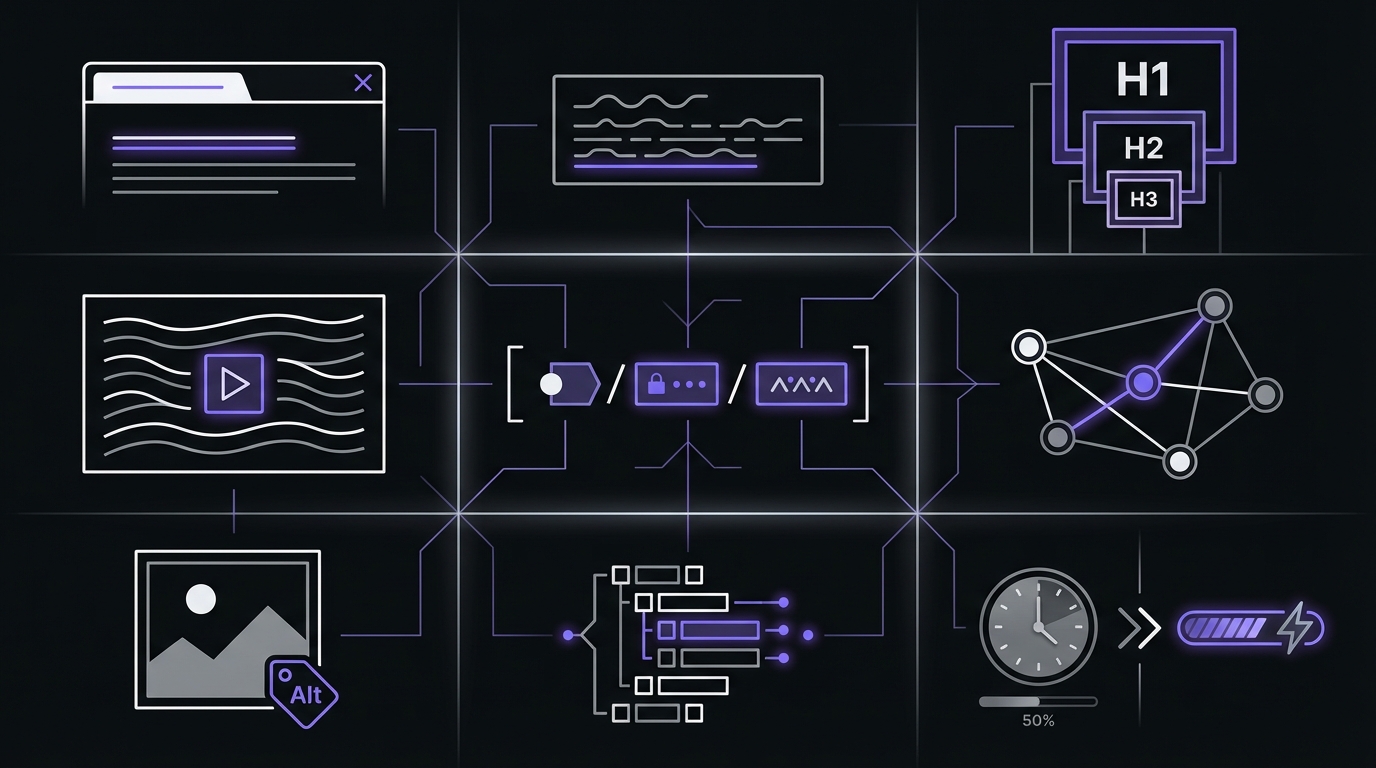
Use this checklist for every page you optimize. Start with your most important pages—those already ranking between positions 5-20 with high impression counts, or pages with high business value that are underperforming.
☑️ 1. Title Tag Optimization
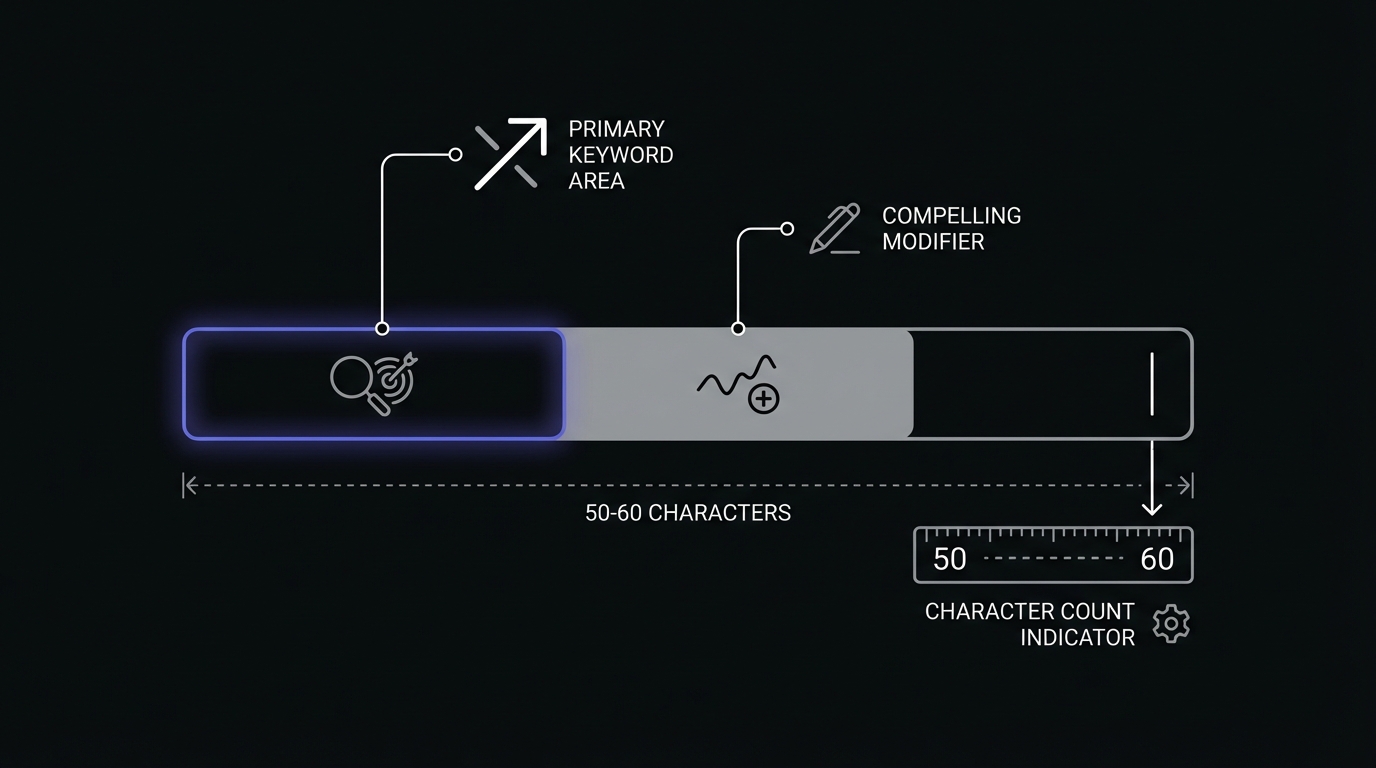
The HTML <title> element appearing as the clickable headline in search results. Most important on-page ranking factor and first thing users see.
Why It Matters:
- Strong ranking signal (keyword placement matters)
- Affects click-through rate dramatically
- Appears in browser tabs and social shares
- Limited real estate (~60 characters)
Best Practices:
✅ Include your primary keyword (preferably near the beginning)
- Good: "Keyword Research for Beginners: Complete 2026 Guide"
- Bad: "Learn About Finding Search Terms and Stuff"
✅ Keep it 50-60 characters (to avoid truncation)
- Google displays approximately 60 characters on desktop
- Mobile displays fewer (around 50 characters)
- Front-load the most important words
✅ Make it compelling (not just keyword-stuffed)
- Include power words: Ultimate, Complete, Essential, Proven, Step-by-Step
- Add numbers: "10 Ways," "7 Strategies," "2026 Guide"
- Create curiosity or promise specific value
✅ Match search intent (look at what currently ranks)
- Informational query → Use "How to," "Guide," "What is"
- Commercial intent → Use "Best," "Top," "Review," "Comparison"
- Transactional intent → Use "Buy," "Order," "Hire," "Get"
✅ Make each title unique (no duplicate titles across your site)
- Check in GSC: Index Coverage section flags duplicate titles
- Avoid template-generated duplicate titles
Common Mistakes:
- ❌ Keyword stuffing: "Keyword Research Keywords Research Tools Keywords"
- ❌ Too generic: "Home," "Products," "Blog Post #47"
- ❌ Too long: Gets cut off in search results, losing impact
- ❌ Not matching intent: "Buy keyword tools" when query is "how to do keyword research"
GSC Connection:
Track title tag performance in Google Search Console:
- Go to Performance → Pages report (learn how to analyze your pages effectively)
- Select the page you optimized
- View the queries driving traffic
- Check CTR compared to position benchmarks
CTR Benchmarks by Position:
| Position | Expected CTR Range |
|---|---|
| 1 | 28-31% |
| 2 | 14-16% |
| 3 | 10-12% |
| 4 | 7-8% |
| 5 | 5-6% |
| 6-10 | 2-4% |
If you're ranking #1 but only getting 15% CTR, your title tag likely needs improvement. Similarly, if you're #5 and getting 2% CTR when the benchmark is 5-6%, your title isn't compelling enough.
☑️ 2. Meta Description Optimization
What It Is:
The meta description is the HTML <meta name="description"> tag that often appears as the snippet below your title in search results. It's NOT a direct ranking factor, but it significantly impacts whether users click on your result.
Why It Matters:
- Influences click-through rate (your ad copy in organic search)
- Provides space for persuasive copy and calls-to-action
- Opportunity to stand out from competitors
- Google rewrites them approximately 63% of the time, but optimization still improves CTR
Best Practices:
✅ Keep it 150-160 characters (sweet spot for full display)
- Longer descriptions get truncated
- Mobile displays fewer characters (~120)
- Make the first 120 characters count
✅ Include your target keyword (Google bolds matching query terms)
- Makes your result visually stand out
- Signals relevance to searchers
- Natural inclusion, not forced repetition
✅ Write compelling copy (not just keyword repetition)
- State a clear value proposition
- Include a call-to-action
- Create curiosity or promise a specific benefit
- Address the user's pain point or question
✅ Match search intent (answer the user's question)
- Informational: "Learn how to..."
- Commercial: "Compare the best..."
- Transactional: "Get started with..."
Example Evolution:
❌ Bad: "This page is about keyword research and SEO stuff."
⚠️ Better: "Keyword research tutorial covering how to find keywords for SEO."
✅ Best: "Learn keyword research with this step-by-step guide. Find high-value keywords using free tools and Google Search Console. Includes downloadable checklist."
When Google Rewrites Your Description:
Google rewrites meta descriptions when it thinks it can better match the specific search query. Google pulls alternative text from your page content. This isn't necessarily a problem—Google is trying to serve users better.
Your job: Write a strong meta description AND ensure your page content is clear and comprehensive so Google has good material to work with if it does rewrite.
GSC Connection:
You can't directly see meta description performance in Search Console, but you can infer issues:
- High position + low CTR often indicates weak title or meta description
- Check the Search Appearance section for rich results (which replace standard meta descriptions)
- Compare your CTR to position benchmarks in the Performance report
☑️ 3. Header Tag Structure (H1-H6)
What It Is:
Header tags are HTML heading elements (<h1>, <h2>, <h3>, etc.) that create content hierarchy and structure. Think of them as the outline for your page—the H1 is your main title, H2s are chapter titles, and H3s are subsections.
Why It Matters:
- Helps Google understand content organization and main topics
- Makes content scannable for users (most people scan, don't read fully)
- Critical for accessibility (screen readers use headers for navigation)
- Moderate ranking factor (keyword placement in headers matters)
Best Practices:
✅ One H1 per page (your main topic/headline)
- Should be similar to your title tag (but can be longer since it's not truncated)
- Include primary keyword naturally
- Clear statement of what the page covers
✅ Use H2s for main sections (like chapter titles)
- Each H2 represents a major subtopic
- Include secondary keywords where natural
- Help users scan for relevant sections
✅ Use H3s for subsections (under H2s)
- Break down complex H2 sections
- Further segment content for readability
- Create deeper hierarchy when needed
✅ H4-H6 for deeper nesting (use sparingly)
- Most content only needs H1-H3
- Don't skip levels (going from H2 to H4 without H3 creates messy hierarchy)
✅ Maintain logical hierarchy (like an outline)
H1: Main Topic
  H2: Major Section 1
    H3: Subsection 1.1
    H3: Subsection 1.2
  H2: Major Section 2
    H3: Subsection 2.1
    H3: Subsection 2.2
Common Mistakes:
- ❌ Multiple H1s per page (confuses hierarchy)
- ❌ Using headers for styling instead of structure (use CSS to make text bigger, not H3)
- ❌ Skipping levels (H2 → H4)
- ❌ Keyword stuffing in headers ("On-Page SEO On-Page Optimization SEO Checklist")
Real Example Structure:
H1: On-Page SEO Checklist: The Essentials That Actually Matter
  H2: What Is On-Page SEO?
    H3: The Simple Definition
    H3: Why On-Page SEO Matters
    H3: The Ranking Impact
  H2: The On-Page SEO Checklist
    H3: Title Tag Optimization
    H3: Meta Description Optimization
    H3: Header Tag Structure
  H2: Common On-Page SEO Mistakes
This creates a clear, logical structure that both users and search engines can easily understand.
☑️ 4. Content Quality and Optimization
What It Is: Your content is the actual text, images, and media on your page. It's the #1 ranking factor—great on-page optimization won't save poor content, but poor optimization can hold back great content.
Why It Matters:
- Google's algorithms evaluate content comprehensiveness and quality
- User engagement signals (time on page, bounce rate) feed back into rankings
- Better content earns more backlinks naturally
- Satisfying search intent is THE key to ranking
Best Practices:
✅ Match search intent perfectly
- Informational query → Comprehensive guide or tutorial
- Commercial intent → Comparison, review, or "best of" list
- Transactional intent → Product/service page with clear CTAs
- Check what currently ranks (Google shows you the intent)
✅ Cover the topic comprehensively
- Answer the main question thoroughly
- Address related questions (check "People Also Ask" in search results)
- Include examples, data, and specific details
- Go deeper than competitors (but stay focused)
✅ Use target keyword naturally (not forced)
- In the first 100-150 words (Google weights early placement heavily)
- In a few H2/H3 headers where natural
- Throughout content at ~1-2% keyword density (1-2 mentions per 100 words)
- Use synonyms and related terms (semantic variations)
- Don't obsess over exact match—Google understands context
✅ Write for humans first, optimize second
- Clear, engaging writing style
- Logical flow and structure
- Short paragraphs (2-4 sentences)
- Active voice where possible
- Break up text with formatting (bullets, bold, quotes)
✅ Optimal content length
- Length depends on query competitiveness and search intent
- Comprehensive coverage > arbitrary word count
- Long-form content (1,500-3,000 words) often ranks better for competitive queries
- Short-form can rank for simple, straightforward queries
- GSC hint: Check the average length of top 10 results for your target keyword
✅ Update and refresh regularly
- Add new sections based on user questions and comments
- Update outdated information, statistics, and examples
- Add publication and last-updated dates
- Fresh content signals often correlate with better rankings
✅ Include multimedia
- Relevant images that break up text
- Screenshots for tutorials and how-to guides
- Videos where they add value
- Charts and graphs for data visualization
- All optimized properly (see Image Optimization below)
Content Quality Indicators (E-E-A-T Signals):
Google evaluates content through E-E-A-T: Experience, Expertise, Authoritativeness, and Trustworthiness. Strengthen these signals:
- Experience: Include personal examples, case studies, and first-hand knowledge
- Expertise: Demonstrate deep understanding with specific details and accurate information
- Authoritativeness: Add author bios with credentials, link to authoritative sources
- Trustworthiness: Cite sources, update regularly, maintain accuracy
Additional quality indicators:
- Original insights, research, or perspectives (not rehashed content)
- Specific examples and case studies (not generic advice)
- Cited sources for claims and statistics
- No grammar or spelling errors
- Proper formatting
- Directly answers the user's question
GSC Connection:
Use Google Search Console to identify content that needs improvement:
- High impressions + low CTR = Topic or title mismatch
- Good position + high bounce rate (combine with GA4) = Content doesn't match intent
- Declining rankings over time = Content may be outdated or outcompeted
Go to Performance → Queries and Pages to find these patterns, then use our content optimization strategy guide to improve underperforming pages.
☑️ 5. URL Structure
What It Is: The URL is the web address of your page, shown in search results and the browser address bar. It's a minor direct ranking factor, but has significant user experience impact.
Best Practices:
✅ Short and descriptive (not long strings of parameters)
- Good:
/on-page-seo-checklist - Bad:
/blog/post/2026/01/21/article-about-seo-stuff-and-optimization-checklist-123456
✅ Include target keyword (when natural)
- Helps users and search engines understand page topic at a glance
- Don't force it if it creates awkward URLs
- Example:
/keyword-research-for-beginnersclearly signals content topic
✅ Use hyphens to separate words (not underscores)
- Good:
/keyword-research-guide - Bad:
/keyword_research_guide(Google treats underscores as connecting characters) - Bad:
/keywordresearchguide(unreadable)
✅ Lowercase only (avoid case-sensitivity issues)
- Good:
/seo-basics - Bad:
/SEO-Basics(some servers treat these as different URLs)
✅ Avoid unnecessary parameters (clean URLs rank better)
- Good:
/category/article-name - Bad:
/page.php?id=123&cat=5&ref=abc
✅ Don't change URLs unnecessarily (after a page is ranking)
- Changing URL loses ranking history and authority
- Requires 301 redirects (can lose some link equity)
- Only change if absolutely necessary (major site restructure, fixing serious issues)
✅ Use canonical tags for duplicate content
- If similar content exists at multiple URLs, use
<link rel="canonical">to specify the primary version - Prevents duplicate content issues and consolidates ranking signals
- Common for product pages with filter parameters or print versions
Common Mistakes:
- ❌ Auto-generated IDs:
/post-123456 - ❌ Dates in URLs:
/2026/01/on-page-seo(makes updates feel outdated) - ❌ Category in URL when category might change later
- ❌ Too many subdirectories:
/blog/category/subcategory/sub-subcategory/article
☑️ 6. Internal Linking
What It Is: Internal links are hyperlinks from one page on your site to another page on your site. They help users navigate and distribute "link equity" (ranking power) throughout your site.
Why It Matters:
- Helps Google discover and index new pages
- Distributes authority to important pages (link equity flows through internal links)
- Shows relationships between content (topical relevance)
- Keeps users engaged longer (session duration)
- Helps establish topical authority in your niche
Best Practices:
✅ Link to related content (3-5 internal links per post minimum)
- Link to parent pillar pages
- Link to related cluster posts
- Link to conversion pages where appropriate
- Link to foundational content for beginners
✅ Use descriptive anchor text (not "click here")
- Good: "Read our keyword research guide"
- Bad: "Click here for more information"
- Include keywords in anchor text when natural
- Vary anchor text (not exact match every time)
✅ Link high → low in hierarchy
- Important pages should link to less important pages
- Distribute authority where you want rankings
- Typical flow: Homepage → Category Pages → Individual Posts
✅ Link contextually (in content, not just sidebar)
- In-content links carry more weight than navigation links
- Link when relevant to surrounding text
- Natural user flow (user would actually want to click)
✅ Update old content with links to new
- When publishing a new post, add relevant links from old related posts
- Helps new content get crawled and indexed faster
- Establishes relevance signals immediately
GSC Connection:
The Links report in Google Search Console shows:
- Top linked pages: Your most internally linked content (should be your most important pages)
- Internal link structure: How pages connect
- Pages with few internal links: May need more internal link building
Check whether your most important business pages are getting internal links from blog content. If your product pages or service pages have fewer internal links than random blog posts, that's a problem.
☑️ 7. Image Optimization
What It Is: Image optimization means making images fast to load, accessible to screen readers, and SEO-friendly. It's often overlooked but impacts rankings, user experience, and accessibility.
Why It Matters:
- Large images slow down page speed (a confirmed ranking factor)
- Alt text helps accessibility and provides context to Google
- Optimized images can rank in Google Image Search (additional traffic source)
- Good user experience (breaks up text, illustrates concepts)
Best Practices:
✅ Compress images (reduce file size without sacrificing quality)
- Target: Under 200KB per image for blog posts
- Use tools: TinyPNG, ImageOptim, Squoosh, or your CMS's built-in compression
- Don't sacrifice too much quality, but avoid unnecessarily large files
- Implement lazy loading for images below the fold
✅ Use descriptive file names (before uploading)
- Good:
on-page-seo-checklist-example.jpg - Bad:
IMG_1234.jpgorscreenshot-2026-01-21.png - Include keywords when relevant and natural
✅ Write descriptive alt text (for every image)
- Describe what the image shows (for accessibility)
- Include keywords if naturally relevant
- Keep it concise (125 characters or less)
- Don't keyword stuff
- Example: "Google Search Console performance report showing organic traffic growth over 6 months"
✅ Choose the right format
- WebP: Best compression for modern browsers (use with fallback)
- JPEG: Photos and complex images with lots of colors
- PNG: Graphics with transparency, screenshots with text
- SVG: Icons and simple graphics (scales infinitely, tiny file size)
- Avoid GIF for static images (large file sizes)
✅ Responsive images (serve appropriate size for device)
- Don't load a 5000px image when displaying at 500px
- Use the
srcsetattribute for responsive sizing - Most modern CMS platforms handle this automatically
✅ Relevant images (not just decoration)
- Illustrate concepts explained in text
- Provide examples and case studies
- Break up long text sections for readability
- Screenshots for step-by-step tutorials
- Original images and screenshots > generic stock photos
Common Mistakes:
- ❌ No alt text (accessibility issue and missed SEO opportunity)
- ❌ Huge file sizes (3MB+ images that destroy page speed)
- ❌ Generic alt text: "image" or "photo" (not descriptive)
- ❌ Keyword stuffing alt text: "SEO checklist on-page SEO optimization on-page checklist"
- ❌ Irrelevant decorative images that slow the page without adding value
☑️ 8. Schema Markup (Structured Data)
What It Is: Schema markup is code (typically JSON-LD format) that helps search engines understand the context and meaning of your page content. It enables rich results in search—those enhanced listings with stars, prices, FAQs, and other eye-catching elements.
Why It Matters:
- Rich results increase click-through rate dramatically (often 30%+ improvement)
- Helps Google understand context beyond just keywords
- Improves appearance in search results (you stand out)
- Voice search and AI assistants rely heavily on structured data
- Competitive advantage (many sites still don't use it)
Common Schema Types:
✅ Article Schema (for blog posts and articles)
- Includes: Headline, author, date published, featured image
- Basic schema that most blog posts should have
- Most CMS platforms and SEO plugins add this automatically
✅ HowTo Schema (for step-by-step guides)
- Numbered steps with descriptions and optional images
- Can appear as enhanced rich result in search
- Perfect for tutorials and process guides
✅ FAQ Schema (for FAQ sections)
- Questions and answers structured for Google
- Can appear expanded directly in search results
- Use for actual FAQs (don't abuse by marking up non-FAQ content)
✅ Breadcrumb Schema (for navigation)
- Shows site structure in search results
- Helps users understand where they are in your site hierarchy
- Good for sites with deep category structures
Implementation:
- Use JSON-LD format (Google's preferred format)
- Validate with Google's Rich Results Test tool
- Monitor in GSC → Enhancements section (shows errors and warnings)
- Don't mark up content that doesn't exist on the page (considered spam)
GSC Connection:
The Enhancements section in Search Console shows:
- Which schema types Google detected on your site
- Errors in implementation
- Valid structured data count
- Rich result eligibility
Fix errors to enable rich results. Even one small error can prevent your rich results from showing.
☑️ 9. Page Speed Optimization
What It Is: Page speed is how fast your page loads and becomes interactive. It's measured by Core Web Vitals—a set of metrics that quantify user experience.
Why It Matters:
- Confirmed ranking factor (especially for mobile search)
- Huge impact on user experience and bounce rate
- Affects engagement metrics (which feed into rankings)
- Mobile-first indexing means mobile speed matters most (Google indexes mobile version first)
- Poor Core Web Vitals can prevent you from ranking
- Over 60% of all web traffic now comes from mobile devices
Key Metrics (Core Web Vitals):
Largest Contentful Paint (LCP) - Loading Performance
- Measures: When the main content loads
- Goal: Under 2.5 seconds
- Improve: Optimize images, implement lazy loading, upgrade hosting, use a CDN
Interaction to Next Paint (INP) - Interactivity
- Measures: Responsiveness to all user interactions throughout the page lifecycle
- Goal: Under 200ms
- Improve: Minimize JavaScript, defer non-critical JS, reduce main thread work
- Note: INP replaced FID as a Core Web Vital in March 2024
Cumulative Layout Shift (CLS) - Visual Stability
- Measures: Unexpected layout shifts while loading
- Goal: Under 0.1
- Improve: Set image and video dimensions, avoid dynamically injected content above existing content
Page Speed Impact on Bounce Rate:
| Load Time | Bounce Rate |
|---|---|
| 1-2 seconds | ~9% |
| 3 seconds | ~32% |
| 5 seconds | ~38% |
| 10+ seconds | ~123% increase |
Quick Wins for Page Speed:
- Compress images (biggest culprit on most sites—see Image Optimization above)
- Enable browser caching (speeds up repeat visits)
- Minify CSS and JavaScript (remove unnecessary code)
- Use a CDN (Content Delivery Network—serves files from servers closer to users)
- Choose fast hosting (cheap shared hosting is often very slow)
- Remove unused plugins (each plugin adds overhead)
- Implement lazy loading (load below-fold images only when needed)
GSC Connection:
Go to Experience → Page Experience report in Search Console to see:
- Core Web Vitals performance for your site
- Which specific URLs have "Poor," "Needs improvement," or "Good" ratings
- Mobile vs desktop breakdown
- Trends over time
Prioritize fixing "Poor" URLs first, especially high-traffic pages. A slow page that gets 10 visits per month is low priority. A slow page that gets 1,000 visits per month is hurting your traffic and rankings significantly.
On-Page Optimization Workflow
Now that you understand the 9 essential elements, here's a systematic workflow for implementing on-page optimization at scale.
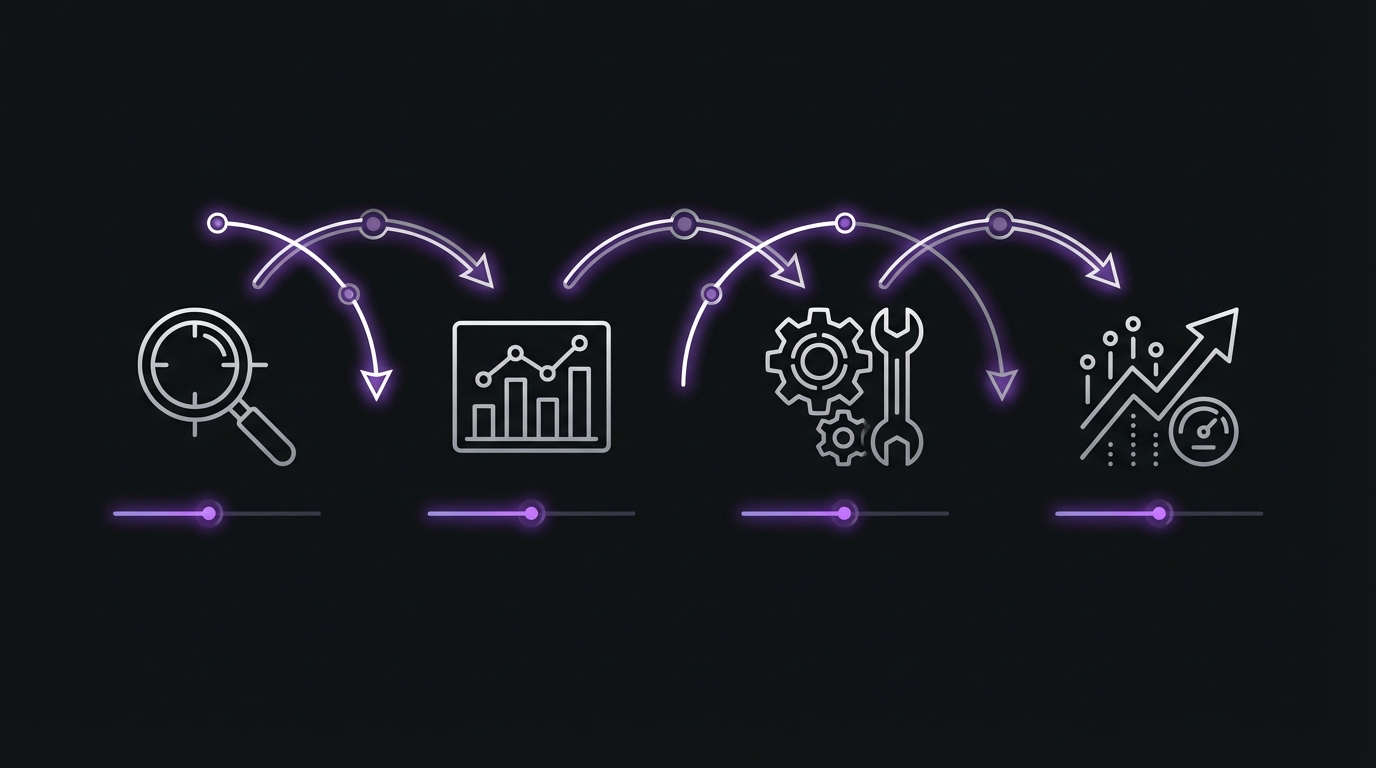
Step 1: Identify Pages to Optimize (30 minutes)
Open Google Search Console and go to Performance → Pages report.
Look for:
- Pages ranking positions 5-20 with high impression counts (quick wins—close to page 1)
- High-traffic pages with declining performance over time (preventing drops)
- High-business-value pages underperforming (maximum ROI)
Prioritize 5-10 pages per month. Don't try to optimize your entire site at once. Focus on the pages that will move the needle.
Step 2: Analyze Current State (15 minutes per page)
For each page you'll optimize:
- Check current rankings and traffic in GSC Performance report
- Review target keywords (what should this page rank for?)
- Analyze the top 10 competitors (what's working for them?)
- Identify gaps (what are they doing that you're not?)
Search for your target keyword and actually look at what ranks. Are they guides? Checklists? Videos? Product pages? You need to match the intent of what's currently ranking.
Step 3: Optimize Using the Checklist (60-90 minutes per page)
Work through the 9-point checklist:
- ✅ Optimize title tag
- ✅ Optimize meta description
- ✅ Fix header structure
- ✅ Improve content (expand, update, clarify)
- ✅ Check URL structure (usually don't change)
- ✅ Add internal links from this page and TO this page
- ✅ Optimize images (compress, alt text, file names)
- ✅ Add schema markup
- ✅ Check page speed and fix major issues
Not every page needs work on every element. Focus on the elements that need the most improvement.
Step 4: Track and Monitor (Ongoing)
- Note the optimization date in a spreadsheet or tracking document
- Check GSC weekly for ranking changes
- Give it 4-6 weeks to see meaningful impact
- Measure: rankings, clicks, impressions, CTR
- Double down on what works
Template: Page Optimization Tracker
Create a simple spreadsheet with these columns:
- URL
- Target Keyword
- Date Optimized
- Before: Position / Clicks / Impressions
- After (4 weeks): Position / Clicks / Impressions
- Change: %
- Notes
Monthly Optimization Routine
- Week 1: Identify 5-10 pages to optimize using GSC data
- Week 2-3: Optimize pages (2-3 per week, ~2 hours each)
- Week 4: Track results and plan next month's optimization targets
- Ongoing: Monitor performance and adjust strategy
Realistic Expectations
Understanding the timeline helps you stay patient and avoid over-optimizing:
- Weeks 1-2: Usually no visible change (Google needs to re-crawl and re-evaluate)
- Weeks 3-4: May see ranking movement (Google is testing your page at new positions)
- Weeks 5-8: Rankings stabilize at the new level
- Typical improvement: 2-5 position jump (e.g., #12 → #7 or #8)
- Traffic impact: Can be 50-200% increase if you cross from page 2 to page 1
Not every optimization will produce dramatic results. Some pages will jump significantly, others will see modest improvements, and some won't move at all. The key is systematic testing and tracking to understand what works for your site.
GSC Tracking Tip: Set up date comparison in Search Console. Compare "Last 28 days" to "Previous period" to see the impact of your optimizations. Filter by the specific pages and queries you optimized to isolate the effect.
Before and After: Real Optimization Examples
Let's look at real examples of on-page optimization impact. These are actual results from optimization projects (metrics simplified for clarity).
Example 1: Title Tag Optimization
Before:
- Title: "Email Marketing Tips and Tricks"
- Position: #15 for "email marketing tips"
- CTR: 2.1%
- Monthly stats: 8,000 impressions, 168 clicks
After Optimization:
- Title: "Email Marketing Tips: 15 Proven Strategies That Increase Opens"
- Position: #9 (6 weeks later)
- CTR: 4.8%
- Monthly stats: 12,000 impressions, 576 clicks
- Result: 243% traffic increase
What Changed:
- Added specific number (15 strategies)
- Added tangible benefit (increase opens)
- More specific and compelling
- Keyword placement improved
The content didn't change at all. Only the title tag changed—and it was enough to improve both rankings (better relevance signal) and CTR (more compelling).
Example 2: Content Expansion
Before:
- Page: "What is keyword research" (800 words, basic definition)
- Position: #18 for "keyword research"
- Monthly traffic: 50 clicks
After Optimization:
- Page expanded to 2,500 words including:
- Step-by-step research process
- Tool recommendations and comparisons
- Examples and screenshots
- Downloadable checklist
- Position: #6 (3 months later)
- Monthly traffic: 450 clicks
- Result: 800% traffic increase
What Changed:
- Comprehensive coverage that better matched search intent
- Added practical value (actionable steps + downloadable resource)
- Improved structure with clear H2/H3 hierarchy
- Added internal links to related content
This demonstrates that comprehensiveness matters. Google wants to rank pages that fully answer the user's question. The original page defined keyword research but didn't help users actually DO keyword research—so it didn't satisfy search intent fully.
Example 3: Internal Linking
Before:
- Page: "Best SEO tools" (great content but only 2 internal links TO it)
- Position: #22 for "best seo tools"
- Monthly traffic: 80 clicks
After Optimization:
- Added contextual links from 10 related blog posts
- Added to pillar page as recommended resource
- Created supporting content that linked to this page
- Position: #12 (8 weeks later)
- Monthly traffic: 320 clicks
- Result: 300% traffic increase
What Changed:
- Internal link count increased from 2 to 12
- Google discovered better context and topical relevance
- Page received more authority through internal link equity
No content changed on the actual page. The only change was internal links pointing TO the page from other pages on the site. This shows the power of internal linking for distributing authority and establishing topical relevance.
Example 4: Image Optimization
Before:
- Page: Product comparison with 15 large, unoptimized images
- Page load time: 8.2 seconds (very slow)
- Core Web Vitals: Poor LCP (5.8 seconds)
- Position: #8 (but declining)
After Optimization:
- Compressed all images (5MB total → 800KB)
- Implemented lazy loading for below-fold images
- Converted images to WebP format with JPEG fallback
- Page load time: 2.1 seconds
- Core Web Vitals: Good LCP (1.9 seconds)
- Position: #5 (4 weeks later)
- Result: 60% traffic increase + significantly better user experience
What Changed:
- Page speed improvement = ranking boost (confirmed ranking factor)
- Better user experience = lower bounce rate, better engagement
- Met Core Web Vitals thresholds (moved from "Poor" to "Good")
This example shows that technical on-page factors like page speed really do matter for rankings, especially when you're competing for positions in the top 10.
Common On-Page SEO Mistakes
Avoid these common pitfalls that can undermine your optimization efforts.
Mistake #1: Optimizing Without Keyword Research
Problem: You optimize for keywords nobody actually searches for.
Solution: Always do keyword research BEFORE optimizing. Use the GSC Queries report to see what people are actually searching and what you already rank for.
Example: Optimizing for "search engine optimization fundamentals" when people actually search for "SEO basics" (10x more search volume).
Mistake #2: Keyword Stuffing
Problem: Repeating keywords unnaturally throughout your content, headers, and metadata.
Solution: Use keywords naturally. Focus on comprehensive topic coverage using synonyms and related terms. Modern Google understands semantic relevance, not just exact keyword matching.
Example: "Keyword research keyword research tools for keyword research optimization and keyword research techniques" = spam that will hurt your rankings.
Mistake #3: Duplicate Title Tags and Meta Descriptions
Problem: Multiple pages on your site have identical titles or meta descriptions. Google sees this as low quality and can't differentiate between pages.
Solution: Write unique titles and meta descriptions for every important page.
Check: Go to GSC → Pages → Index Coverage. Google flags duplicate titles and meta descriptions here.
Mistake #4: Ignoring Search Intent
Problem: Creating the wrong content type for the keyword you're targeting.
Solution: Always check the top 10 results for your target keyword. Match their format and approach (guide vs product page vs comparison).
Example: Writing a blog post optimized for "buy running shoes" when Google only ranks e-commerce product pages for that query. You won't rank because the intent is transactional, not informational.
Mistake #5: Thin Content
Problem: Publishing 300-500 word posts that barely scratch the surface of a topic.
Solution: Comprehensive coverage of topics. For competitive queries, this usually means 1,500-3,000 words. Check the average word count of top-ranking pages for your target keyword.
GSC hint: If you're ranking #15-30, look at what's ranking #1-10. Are they all 3,000-word comprehensive guides while you have 500 words? That's your problem.
Mistake #6: No Internal Links
Problem: Pages exist in isolation with no internal links pointing to them or from them.
Solution: Every page should have at least 3-5 contextual internal links (both TO it and FROM it). Internal linking helps Google discover pages, understand context, and distribute authority.
Check: GSC Links report shows which pages have few internal links.
Mistake #7: Slow Page Speed
Problem: Large images, excessive plugins, or poor hosting cause slow load times.
Solution: Compress images, minimize code, use fast hosting. Aim for under 3 seconds total load time.
Check: GSC → Experience → Page Experience report shows your Core Web Vitals performance.
Mistake #8: Optimizing Once and Forgetting
Problem: You optimize a page once, then never touch it again. Content becomes outdated and competitors improve their pages.
Solution: Quarterly review and updates of important pages. Add new information, update statistics, refresh examples, expand sections based on user questions.
GSC signal: Declining rankings over time often means your content is becoming less competitive or outdated.
Your Next Step: Set Up Google Search Console
You now know how to optimize your pages for search engines. But how do you track whether your optimizations are working? That's where Google Search Console becomes essential.
→ Next: How to Set Up Google Search Console: Complete Guide
Google Search Console is your free SEO measurement tool that shows exactly how people find your site through search. Without it, you're optimizing blind—you won't know which keywords you rank for, which pages perform best, or whether your on-page improvements actually improved rankings.
This step-by-step guide walks you through setting up GSC correctly, choosing the right verification method, and understanding the difference between domain and URL prefix properties. It takes about 15 minutes to set up, and the data you get is invaluable for tracking your SEO progress.
Conclusion
On-page SEO is about optimizing what you fully control on your web pages. It's the most accessible lever for improving search rankings because you don't need to wait for backlinks, domain authority, or third parties—you can implement everything today.
The 9 essential elements that actually matter:
- Title tag optimization
- Meta description optimization
- Header tag structure
- Content quality and optimization
- URL structure
- Internal linking
- Image optimization
- Schema markup
- Page speed optimization
Focus your efforts where they'll have the most impact: Pages already ranking between positions 5-20 with high impression counts. These are your quick wins—pages that are close to the first page and just need optimization to push them over the edge.
Set realistic expectations: Results typically become visible within 4-8 weeks. You'll often see a 2-5 position improvement, which can translate to 50-200% traffic increase if you cross from page 2 to page 1.
Track everything in Google Search Console. Use the Performance report to identify opportunities, monitor ranking changes, and measure the impact of your optimizations. Use date comparison to isolate the effect of specific optimization efforts.
Key Takeaways
- ✅ Start with high-priority pages (traffic potential + current position 5-20)
- ✅ Work through the checklist systematically—don't skip elements
- ✅ Content quality > technical perfection—match search intent above all else
- ✅ Track results and iterate—double down on what works
- ✅ Be patient—give optimizations 4-6 weeks before evaluating
Your On-Page Optimization Plan
- Download and save this checklist for reference
- Identify 5 pages to optimize this month using Google Search Console
- Work through the 9-point checklist for each page (2-3 hours per page)
- Track results in GSC after 4-6 weeks
- Repeat monthly as an ongoing optimization process
Next Steps
Continue building your SEO knowledge with these related guides:
- Complete SEO Basics Guide - Master the fundamentals of search engine optimization
- Keyword Research for Beginners - Find the right keywords to target before optimizing
- Technical SEO Basics - Ensure your site's foundation is solid
- How to Read Your GSC Performance Report - Track your optimization results
- Content Optimization Strategy Using GSC - Advanced content optimization techniques
- CTR Analysis and Optimization - Improve click-through rates for better traffic
Remember: On-page SEO won't overcome terrible content or zero authority. But when you have solid content and baseline credibility, on-page optimization is often the difference between first page and second page in search results—and that's the difference between thousands of visitors or almost none.
Use this checklist to give your good content the best possible chance to rank.
Download the Printable Checklist
Want a PDF version of this on-page SEO checklist that you can print and reference while optimizing?
Get the printable checklist including:
- All 9 optimization elements with checkboxes
- Quick reference for best practices
- Common mistakes to avoid
- Page optimization tracker template
- Monthly optimization workflow
Download Free On-Page SEO Checklist PDF →
No spam. Just the checklist and occasional SEO tips.
Track Your Optimization Results in Google Search Console
Haven't set up Google Search Console yet? It's completely free and essential for tracking your on-page SEO improvements.
Learn How to Set Up Google Search Console →
Related Articles
- Complete SEO Basics Guide - Master the fundamentals
- Keyword Research for Beginners - Find the right keywords
- Technical SEO Basics - Fix foundational issues
- How to Read Your GSC Performance Report - Track results
- Content Optimization Strategy Using GSC - Advanced tactics
- CTR Analysis and Optimization - Improve click rates
Schema Markup (JSON-LD):
{
  "@context": "https://schema.org",
  "@type": "Article",
  "headline": "On-Page SEO Checklist: The Essentials That Actually Matter",
  "description": "Master on-page SEO with this actionable checklist. Optimize title tags, headers, content, images, and more. Track results in Google Search Console.",
  "author": {
    "@type": "Organization",
    "name": "SEO Insights Team"
  },
  "datePublished": "2026-01-21",
  "dateModified": "2026-01-21",
  "image": "https://example.com/images/on-page-seo-checklist.jpg",
  "publisher": {
    "@type": "Organization",
    "name": "SEO Insights",
    "logo": {
      "@type": "ImageObject",
      "url": "https://example.com/logo.png"
    }
  }
}