Keyword Research for Beginners (Free Tools)
Learn keyword research step-by-step using free tools like Google Search Console. Find what your audience searches, prioritize keywords, and create content that ranks.

Keyword Research for Beginners: Finding What Your Audience Searches
Introduction
Write the world's best content for the wrong keywords, and nobody finds it.
That's SEO reality. 68% of all online experiences begin with a search engine, and organic search drives 53% of all website traffic. But optimizing for terms nobody searches (or impossibly competitive terms) leaves your content unread on page 47.
Keyword research bridges what you want to talk about and what your audience needs:
- What words people type into Google
- How many search for each term
- How difficult ranking would be
- What content searchers expect
You don't need expensive tools. Google Search Console—free—shows what keywords you already rank for. And with Google processing over 5.5 billion searches daily, understanding what people search for remains the foundation of discoverability—even as AI Overviews and chatbots change how some users find information.
You'll learn:
- What keyword research means
- Why search intent matters more than volume
- Step-by-step process using free tools
- How to prioritize strategically
- Creating a content plan from keyword data
By the end, you'll find keywords your audience searches, assess which to target, and create a content plan that drives traffic.
What Is Keyword Research?
The Simple Definition
Keyword research finds the words and phrases people type into search engines.
Understand the language your customers use—not industry jargon you prefer.
Your company might call it "enterprise resource planning software," but customers Google "business management tools" or "software to run my company." Optimize only for technical terms, miss most of your audience.
Keyword research helps you discover:
- Questions people are asking: "How do I train my puppy?" not "canine behavioral modification techniques"
- Problems they're trying to solve: "get rid of fruit flies" not "drosophila melanogaster elimination"
- Products they want to buy: "best standing desk under $500" not "ergonomic workstation solutions"
- Comparisons they're making: "Shopify vs WooCommerce" tells you exactly what content to create
The goal is simple: understand your audience's language, then speak it.
Target Topics, Not Individual Words
Old-school SEO focused on exact phrases. You'd mention "blue widgets" exactly 15 times.
Google now understands:
- Synonyms: "running shoes," "athletic footwear," "sneakers for jogging"
- Context: "apple" means different things in "apple pie recipe" vs "apple stock price"
- Related concepts: A guide about "starting a garden" covers planning, soil, seeds, watering
- User intent: Someone searching "best CRM" wants comparisons, not definitions
Target topics and intent, not individual keyword phrases.
Example: Create one comprehensive guide covering "keyword research," "how to do keyword research," and "keyword research tutorial." Google ranks it for all related searches.
According to an Ahrefs study, the average #1 ranking page also ranks for approximately 1,000 other relevant keywords. One well-optimized piece captures traffic from dozens or hundreds of related searches.
The Business Value of Keyword Research
Let's look at the difference keyword research makes:
Without keyword research (guessing):
- A pet supply store writes 50 blog posts about "canine nutrition optimization," "feline dietary requirements," and "optimal feeding schedules for domestic animals"
- Traffic after 6 months: 127 visits/month
- Conversions: 2 sales
With keyword research (data-driven):
- The same store discovers people actually search for "what to feed my dog" (40,000 monthly searches), "how much food should I feed my cat" (18,000 searches), and "best puppy food brands" (35,000 searches)
- They write targeted content using this language
- Traffic after 6 months: 5,200 visits/month
- Conversions: 156 sales
Same business. Same expertise. Different approach to content topics. Dramatically different results.
The value is clear:
- More targeted traffic from people actively searching
- Higher conversion rates (you're answering their exact questions)
- Efficient content investment (write what matters, not what doesn't)
- Competitive advantage (you know what works before creating content)
Understanding Search Intent
Why Intent Matters More Than Keywords
Google cares about satisfying searchers, not helping you rank.
If someone searches "running shoes," Google shows:
- Buying guides if the searcher researches
- Product pages if they're ready to purchase
- Reviews if they're comparing options
Match what the searcher wants, or people bounce back to Google—and Google drops your rankings.
Mismatch:
- User searches: "how to fix a leaky faucet"
- Your page: Plumbing history, technical specifications, PhD-level explanations
- Result: User bounces. You don't rank.
Good match:
- User searches: "how to fix a leaky faucet"
- Your page: Step-by-step tutorial with photos, common problems, video walkthrough
- Result: User stays, solves problem. You rank.
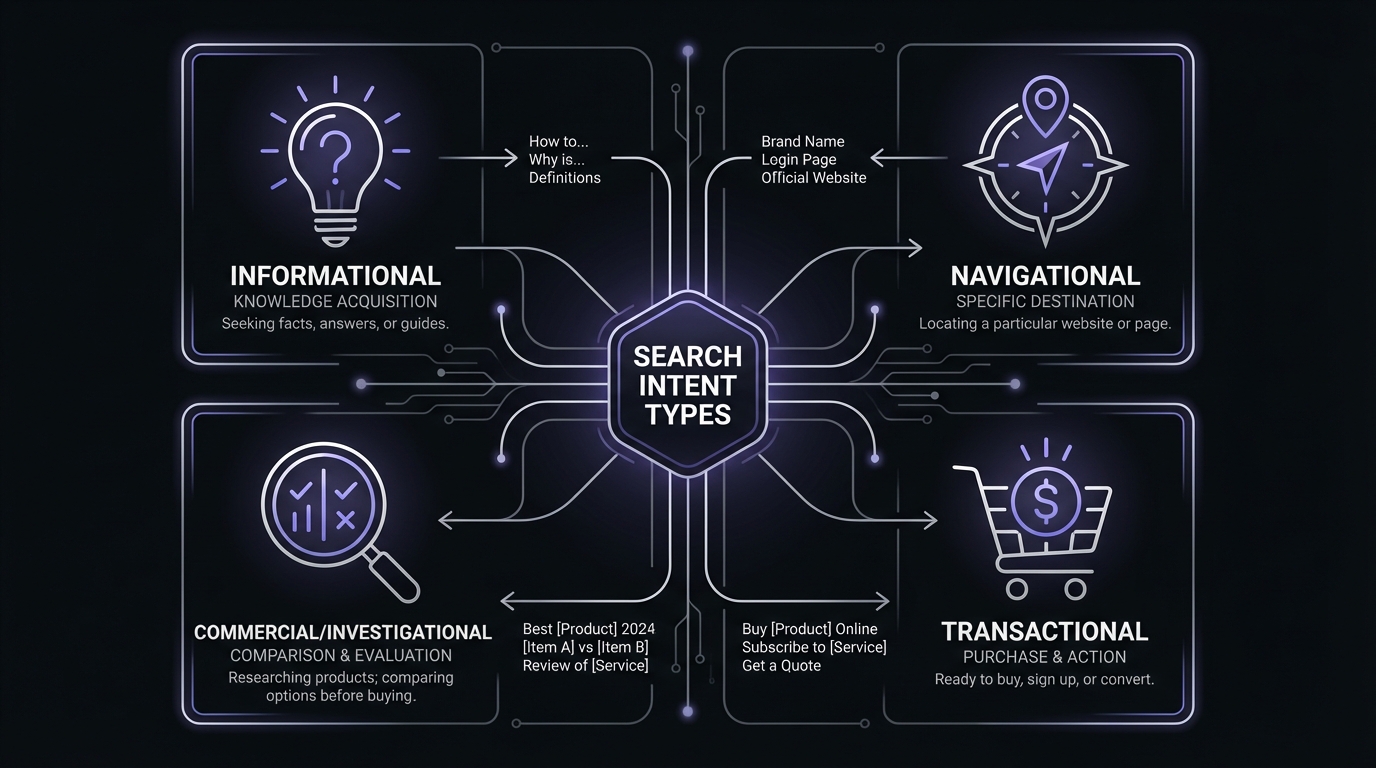
The Four Types of Search Intent
Google categorizes search queries into four main intent types. Understanding these helps you create the right content.
1. Informational Intent (Know)
The user wants to learn something or answer a question.
Common patterns:
- "what is [topic]"
- "how to [do something]"
- "why does [thing happen]"
- "[topic] explained"
- "[topic] tutorial"
Examples:
- "what is keyword research"
- "how to train a puppy"
- "why is my wifi slow"
- "python tutorial for beginners"
Best content types:
- How-to guides and tutorials
- Definitions and explainers
- Educational blog posts
- Video tutorials
- Comprehensive guides
Business value: Top-of-funnel. These users aren't ready to buy yet, but you're building trust and awareness. When they're ready to purchase, they'll remember you.
GSC tip: Informational queries often include question words. Filter your GSC Queries report for "how," "what," "why," "when" to find informational opportunities.
2. Navigational Intent (Website)
The user wants to find a specific website or page.
Common patterns:
- "[brand name] login"
- "[company] support"
- "[product name] reviews"
- "facebook," "youtube," etc.
Examples:
- "gmail login"
- "amazon customer service"
- "ahrefs blog"
- "twitter"
Best content types:
- Your homepage
- Login pages
- Contact pages
- Product pages
- Brand-specific content
Business value: High for your own brand (capture people looking for you). Low for other brands (they're not looking for you).
GSC tip: Look for branded searches in your GSC data. If people search "[your brand] + [topic]," they already trust you—create that content.
3. Commercial Intent (Commercial Investigation)
The user is researching before making a purchase decision.
Common patterns:
- "best [product type]"
- "[product] review"
- "[product A] vs [product B]"
- "top [category]"
- "[product] alternative"
Examples:
- "best project management software"
- "iPhone 15 review"
- "Asana vs Monday.com"
- "top email marketing tools"
- "affordable CRM for small business"
Best content types:
- Comparison articles
- Product reviews
- "Best of" roundups
- Buyer's guides
- Alternative lists
Business value: High! These users are close to buying. They're evaluating options. If you help them decide (and present your product favorably), you'll convert them.
GSC tip: Commercial keywords often include "best," "top," "review," "vs," "comparison," "alternative." These are goldmines for SaaS and ecommerce businesses.
4. Transactional Intent (Buy)
The user is ready to take action—make a purchase, sign up, download, etc.
Common patterns:
- "buy [product]"
- "[product] discount code"
- "[service] near me"
- "[product] free trial"
- "[software] pricing"
Examples:
- "buy standing desk online"
- "pizza delivery near me"
- "mailchimp free trial"
- "asana pricing"
- "hire web designer"
Best content types:
- Product pages
- Pricing pages
- Booking/purchase pages
- Landing pages with clear CTAs
- Local business pages
Business value: Extremely high! These users have their credit cards out. They're ready to buy. If you can't rank for transactional keywords, you're missing revenue.
GSC tip: Transactional queries include "buy," "price," "order," "discount," "near me," "hire." Monitor these closely—they're your money keywords.
How to Identify Intent
Method 1: Look at the keyword itself
- Contains "how to" or "what is" = Informational
- Contains "best" or "review" = Commercial
- Contains "buy" or "price" = Transactional
- Is a brand name = Navigational
Method 2: Look at Google's results
- If top results are guides/tutorials = Informational
- If top results are comparisons/reviews = Commercial
- If top results are product pages = Transactional
- If top results are a specific website = Navigational
Method 3: Check Google's features
- Featured snippets and "People also ask" = Informational
- Shopping results and product carousels = Transactional
- Local pack (map with businesses) = Transactional + Local
- Knowledge panel for specific brand = Navigational
Pro tip: Always Google your target keyword before creating content. Look at what's ranking in positions 1-10. That tells you exactly what Google (and users) expect for that query.
The GSC-First Keyword Research Approach
The best keywords to target are often ones you're already ranking for—just not well.
Google determined your site is relevant for those topics. You need optimization.
Google Search Console shows:
- Keywords you rank for
- Current position per keyword
- Impressions (people who saw your result)
- Clicks you got
- Click-through rate
Start with what you have, then expand.
Step 1: Find Your "Almost There" Keywords
Low-hanging fruit—keywords where you rank positions 8-20. Small improvements move you to top 5.
Find them in GSC:
- Open Google Search Console
- Performance report → Queries tab
- Filter: Position > 7 and Position < 21
- Sort by Impressions (descending)
This shows keywords where you're getting seen but not clicked much—you have ranking potential.
What to do:
Ask:
- Is this relevant to my business?
- What page ranks for this?
- How can I improve it?
Common improvements:
- Better title tag (compelling, includes keyword)
- More comprehensive content (2x longer, more examples)
- Better internal linking
- Add images, videos, media
- Update outdated information
Real example:
A client's blog post ranked #14 for "email marketing tips" (22,000 monthly searches). The post was good but thin—only 800 words.
Actions taken:
- Expanded to 2,500 words with more examples
- Added comparison table of email tools
- Updated title tag to be more compelling
- Added 5 internal links from related posts
- Included downloadable email template
Result: Moved to position #4 in 5 weeks. Traffic increased from 30 visits/month to 450 visits/month.
Step 2: Identify Your Top Performers
These are keywords you're already ranking well for (positions 1-5). Understanding these helps you:
- Double down on what's working
- Find related keywords to target
- Understand your content strengths
How to find them in GSC:
- Performance report → Queries tab
- Add filter: Position < 6
- Sort by Clicks (descending)
What to do with them:
For each top keyword:
- Maintain rankings: Update content regularly, keep information current
- Expand the cluster: Create related content that links to this page
- Find variations: Use these as seed keywords for additional research
- Add CTAs: If it's getting traffic, guide visitors to next steps
Pro tip: Your top-performing keywords reveal your content strengths. If you rank well for "social media marketing" topics, you've established topical authority there. Create more content in that cluster.
Step 3: Discover "Question" Keywords
People asking questions are the easiest to satisfy with content. They have clear informational intent, and if you answer their question comprehensively, you'll rank.
How to find questions in GSC:
- Performance report → Queries tab
- Click Filter → Query
- Choose "Custom (regex)"
- Enter:
how|what|why|when|where|who|can|should - Apply filter
This shows all queries containing question words.
What to do with them:
- High-volume questions = dedicated blog post
- Related questions = combine into comprehensive guide
- Already ranking for some? Create FAQ section
- Not ranking yet? New content opportunity
Example question clusters:
If you find queries like:
- "how to start a blog"
- "how to choose a blogging platform"
- "how to write blog posts"
- "how much does blogging cost"
You should create: "Complete Guide to Starting a Blog in 2026" that covers all these questions in one comprehensive post.
Free Keyword Research Tools
While Google Search Console shows you what you're already ranking for, you need additional tools to find new opportunities. Here are the best free options:
1. Google Search Console (Free - Start Here)
What it shows:
- Keywords you currently rank for
- Your position for each keyword
- Impressions and clicks
- Click-through rate
- Pages that rank
Best for:
- Finding "almost there" keywords (positions 8-20)
- Understanding what you rank for
- Tracking ranking changes over time
- Finding questions people ask
Limitations:
- Only shows keywords you already rank for (not new opportunities)
- Doesn't show search volume
- Doesn't show keyword difficulty
How to use it: See "GSC-First Approach" section above.
Link to: How to Read Your GSC Performance Report for detailed tutorial.
2. Google's "People Also Ask" (Free)
What it shows:
- Related questions people ask
- Topics Google considers related
- Question-based content opportunities
Best for:
- Finding FAQ content ideas
- Understanding related topics
- Creating comprehensive guides
How to use it:
- Google your target keyword
- Look at the "People also ask" box
- Click on questions to expand—more will appear
- Note questions relevant to your audience
- Create content that answers these questions
Example: Search "keyword research" and Google shows:
- "How do I do keyword research?"
- "What are the 4 types of keywords?"
- "What is a good keyword for SEO?"
- "How do you know if a keyword is good?"
Each of these could be a section in your guide or a dedicated piece of content.
3. Google Autocomplete (Free)
What it shows:
- Popular search queries
- What people commonly search for
- Long-tail variations
Best for:
- Finding question-based queries
- Discovering long-tail keywords
- Understanding search patterns
How to use it:
- Go to Google.com
- Start typing your seed keyword
- Note the autocomplete suggestions
- Try adding letters: "keyword research a," "keyword research b," etc.
- Try question words: "how to keyword research," "why keyword research," etc.
Pro tip: Use incognito mode to avoid personalized results.
Example: Type "keyword research" and Google suggests:
- keyword research tools
- keyword research tutorial
- keyword research for youtube
- keyword research for amazon
- keyword research template
Each suggestion represents actual search demand.
4. Google Trends (Free)
What it shows:
- Search trend over time (growing, declining, seasonal)
- Regional interest
- Related queries
- Related topics
Best for:
- Comparing keyword popularity
- Finding trending topics
- Understanding seasonality
- Regional targeting
How to use it:
- Go to trends.google.com
- Enter your keyword
- Check the trend line (growing? declining?)
- Scroll to "Related queries" section
- Look at "Rising" queries (growing in popularity)
When to use it:
- Before creating evergreen content (make sure topic isn't dying)
- Planning seasonal content (when to publish)
- Choosing between similar keywords (which has more momentum)
Example: "SEO" vs "search engine optimization"
- "SEO" has 5x more search volume
- Both are stable (not declining)
- "SEO" is preferred in all regions
- Conclusion: Use "SEO" in your content, not "search engine optimization"
5. AnswerThePublic (Free Tier)
What it shows:
- Questions people ask (visualized)
- Prepositions (to, for, with, etc.)
- Comparisons (vs, or, and, etc.)
- Related searches
Best for:
- Finding question-based content ideas
- Creating comprehensive topic clusters
- Understanding customer concerns
How to use it:
- Go to answerthepublic.com
- Enter your seed keyword
- Review the visualization of questions
- Export the list (free tier allows limited exports)
- Prioritize based on relevance to your business
Limitations:
- Free tier limits searches per day
- Doesn't show search volume
- Can be overwhelming (hundreds of suggestions)
Pro tip: Focus on the "questions" section first—these are easiest to turn into content.
6. Keyword Surfer (Free Chrome Extension)
What it shows:
- Search volume directly in Google results
- Related keywords
- Content suggestions
- Word count of ranking pages
Best for:
- Quick search volume checks
- Understanding competition
- Finding related terms
How to use it:
- Install the Keyword Surfer extension
- Google any keyword
- See search volume in the search bar
- View related keywords in the right sidebar
- Check word count of competing articles
Why it's valuable: You get search volume data (usually requires paid tools) completely free while you browse.
7. Google Search Results (Free)
What it shows:
- What content currently ranks
- Content format Google prefers (guides, videos, lists, etc.)
- How comprehensive content needs to be
- What titles attract clicks
Best for:
- Understanding competition
- Identifying content gaps
- Matching search intent
How to use it:
- Google your target keyword
- Analyze the top 10 results
- Note patterns:
- What content format? (list posts, guides, comparisons)
- How long are the articles? (check word count)
- What angle do they take?
- What's missing? (your opportunity)
Questions to ask:
- Can I create something significantly better?
- Is there an angle not covered?
- Are results outdated? (opportunity to publish fresh content)
- What format is ranking? (you must match it)
Step-by-Step Keyword Research Process
Now let's put it all together into a repeatable process. Follow these steps for any new content topic or SEO project.
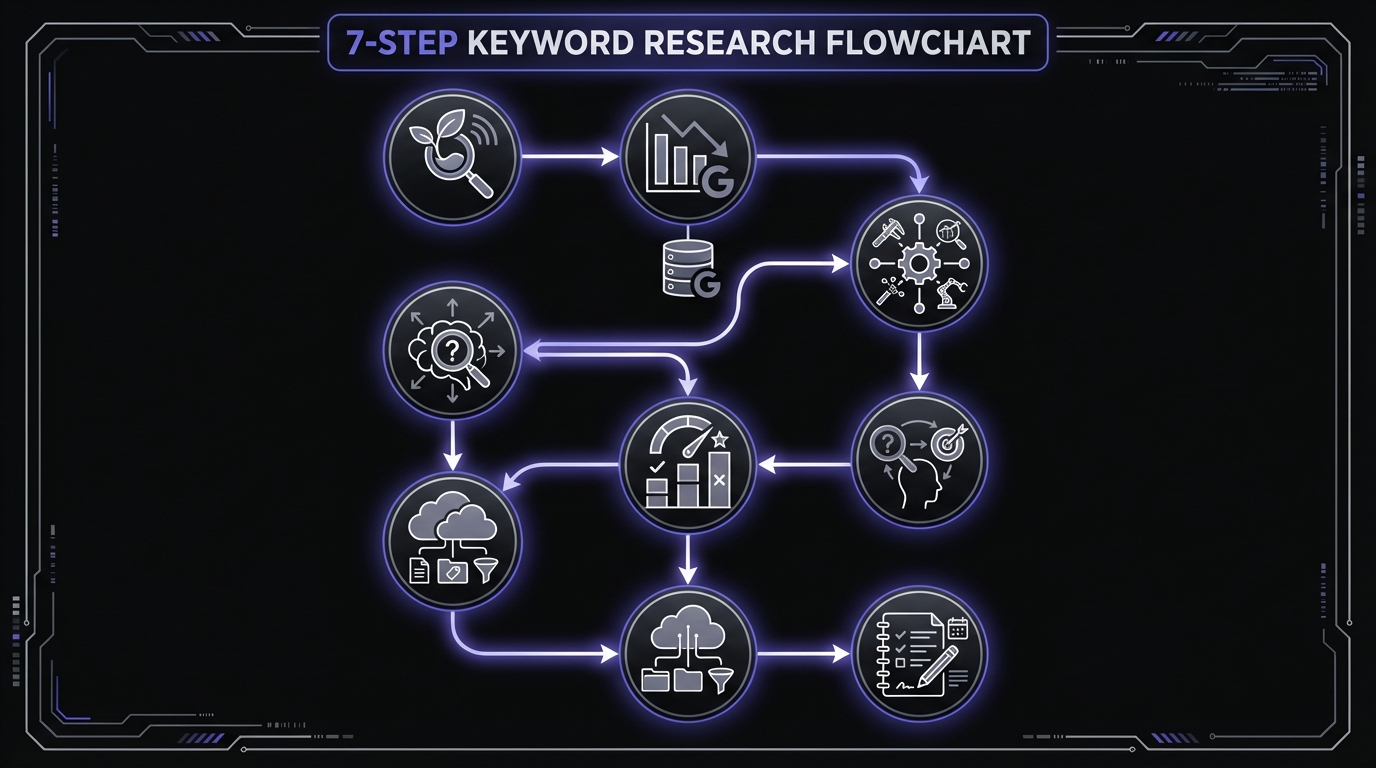
Step 1: Start With Seed Keywords (10 minutes)
Seed keywords are your starting point—broad topics related to your business.
How to brainstorm seed keywords:
-
List your products/services
- What do you sell or offer?
- What problems do you solve?
-
Think like a customer
- What would you Google if you needed your product?
- What language do customers use (not industry jargon)?
-
Check your website
- What are your main pages about?
- What categories do you have?
-
Ask your team
- Sales: What questions do prospects ask?
- Support: What problems do customers need help with?
- Product: What features do users search for?
Example - Email marketing software:
Seed keywords might be:
- email marketing
- email campaigns
- email automation
- newsletter software
- email marketing tools
Pro tip: Start with 5-10 seed keywords. You'll expand from here.
Step 2: Use GSC to Find Current Rankings (20 minutes)
Before researching new keywords, see what you already rank for.
Process:
- Open Google Search Console → Performance report
- Export your queries: Click "Export" → Download Google Sheets or CSV
- Filter for relevant queries: Remove branded searches, irrelevant terms
- Categorize by intent:
- Informational (how-to, what is, guide)
- Commercial (best, review, comparison)
- Transactional (buy, pricing, near me)
- Identify opportunities:
- Positions 8-20 = optimization opportunities
- Positions 1-5 = cluster expansion opportunities
- Questions = FAQ/guide content
Create a spreadsheet with:
- Keyword
- Current position
- Impressions
- Clicks
- CTR
- Intent type
- Action (optimize, expand, maintain)
This is your foundation. You're building on existing authority rather than starting from scratch.
Step 3: Expand With Free Tools (30 minutes)
Now expand your list using free tools.
Process:
-
Google Autocomplete
- Type each seed keyword
- Note suggestions
- Try question patterns (how to, what is, etc.)
- Try each letter of alphabet (keyword + a, keyword + b, etc.)
-
People Also Ask
- Google each seed keyword
- Expand all PAA questions
- Note relevant questions
- Look for patterns (common themes)
-
Related Searches
- Scroll to bottom of Google results
- Note "Related searches" section
- Click each one to find more
-
AnswerThePublic
- Enter seed keyword
- Focus on Questions tab
- Export the list
- Prioritize relevant questions
-
Google Trends
- Check if keywords are growing or declining
- Find related queries
- Look at "Rising" queries
Result: You should now have 50-100+ keyword ideas.
Step 4: Assess Search Intent (20 minutes)
Not all keywords are worth targeting. You need to match intent.
For each keyword, ask:
-
What does the searcher want?
- Information/education?
- To compare options?
- To make a purchase?
-
What content type ranks?
- Google the keyword
- Look at positions 1-10
- Note the pattern (guides, lists, videos, product pages, etc.)
-
Can I create that content type?
- If product pages rank but you don't sell products = skip it
- If guides rank and you can write guides = target it
-
Does this align with my goals?
- Informational = brand awareness, top-of-funnel
- Commercial = consideration phase, mid-funnel
- Transactional = conversion, bottom-of-funnel
Mark each keyword:
- ✅ Good fit (intent matches what you can create)
- ⚠️ Partial fit (possible but not ideal)
- ❌ Poor fit (intent mismatch or can't compete)
Example:
If you sell project management software:
- "what is project management" = ✅ Good (you can write guide)
- "best project management software" = ✅ Good (you can create comparison featuring your product)
- "Asana login" = ❌ Poor (navigational query for competitor)
- "free project management template" = ✅ Good (you can create lead magnet)
Step 5: Estimate Difficulty & Prioritize (30 minutes)
Not all keywords are equally easy to rank for. Prioritize strategically.
Understanding Keyword Difficulty (KD) Scores:
If you use paid tools like Ahrefs or Semrush, they provide a Keyword Difficulty score from 0-100. Here's what those numbers mean for beginners:
| KD Range | Difficulty | Who Can Rank |
|---|---|---|
| 0-30 | Low | New sites with quality content can rank |
| 31-60 | Medium | Requires some domain authority and backlinks |
| 61-80 | Hard | Needs strong authority and link profile |
| 81-100 | Very Hard | Dominated by major brands (Forbes, HubSpot, etc.) |
Beginner strategy: Focus on keywords with KD below 30 until you build authority.
Assessing difficulty (without paid tools):
-
Google the keyword
-
Check the competition:
- Are results from major brands? (high difficulty)
- Are results from small blogs? (lower difficulty)
- How comprehensive are top articles? (how much better can you do?)
- How old are the results? (outdated = opportunity)
-
Check domain authority (roughly):
- Do top results rank well for many topics? (strong site)
- Are they new sites with few rankings? (weaker site)
-
Look for content gaps:
- Is information outdated?
- Is something missing from current results?
- Can you provide unique value?
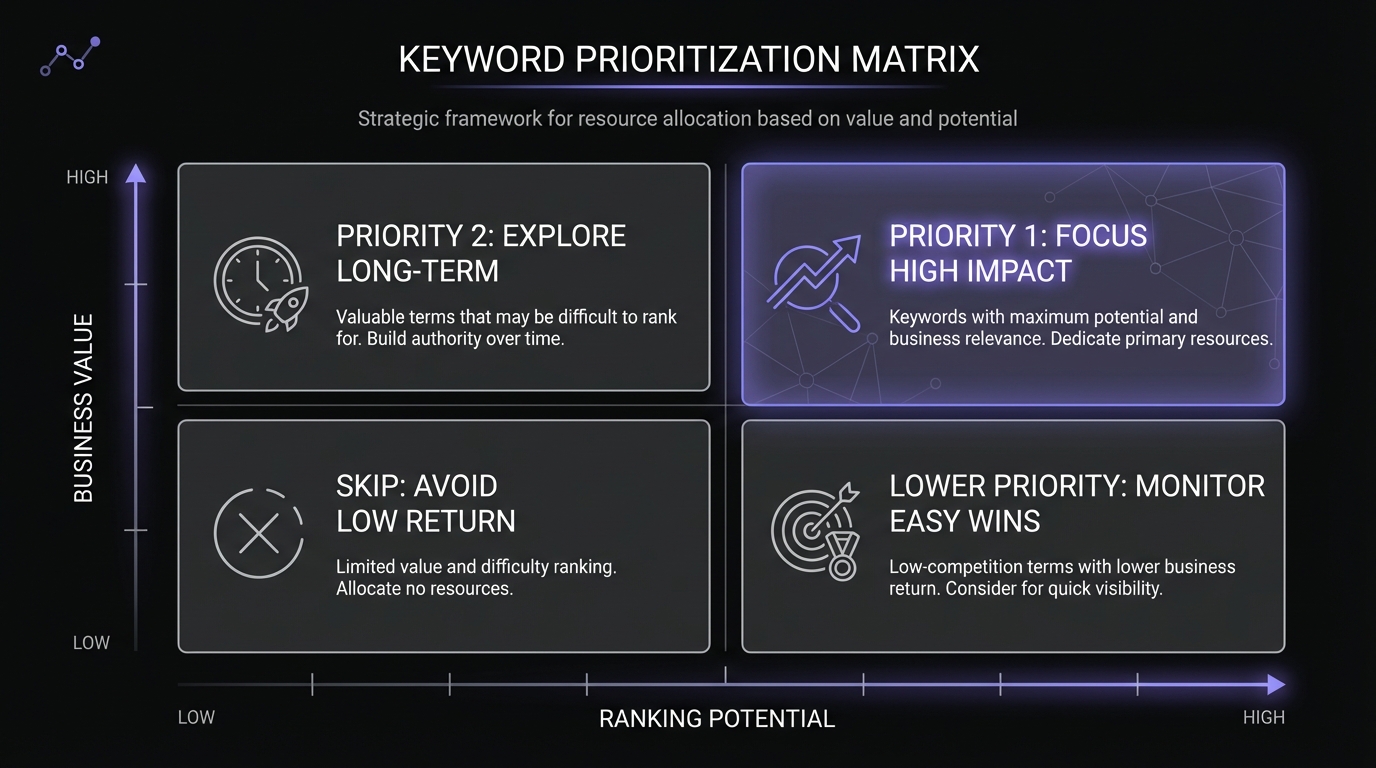
Prioritization matrix:
Score each keyword on:
Business value (1-10):
- How relevant is this to your business?
- How likely to convert?
- How many potential customers search this?
Ranking potential (1-10):
- Do you have existing content on this?
- Do you have topical authority here?
- How strong is the competition?
Search volume (estimate):
- Use Keyword Surfer for rough numbers
- High, medium, or low (relative to your niche)
Priority formula: (Business Value × Ranking Potential) + Search Volume Bonus
Focus on:
- High business value + High ranking potential = Priority 1 (do first)
- High business value + Medium ranking potential = Priority 2 (do second)
- Low business value regardless of difficulty = Priority 3 or skip
Real example:
Let's say you run a small email marketing software company:
| Keyword | Business Value | Ranking Potential | Est. Volume | Priority |
|---|---|---|---|---|
| email marketing tips | 6/10 | 8/10 | High | HIGH |
| best email marketing software | 10/10 | 3/10 | High | MEDIUM |
| how to write marketing emails | 8/10 | 9/10 | Medium | HIGH |
| mailchimp vs constant contact | 7/10 | 4/10 | Medium | MEDIUM |
| email automation workflows | 9/10 | 7/10 | Low | HIGH |
Priority order:
- "email marketing tips" and "how to write marketing emails" (high ranking potential + good business value)
- "email automation workflows" (high business value + decent ranking potential)
- "best email marketing software" later (tough competition)
Step 6: Group Keywords Into Topics (20 minutes)
Modern SEO means targeting topics, not individual keywords. Group related keywords together.
Process:
-
Look for patterns in your keyword list
-
Group variations together:
- "keyword research," "how to do keyword research," "keyword research tutorial" → One topic
- "email automation," "automated email campaigns," "email automation tools" → One topic
-
Identify main topic + supporting keywords:
- Main: "keyword research for beginners" (create comprehensive guide)
- Supporting: "keyword research tools," "free keyword research," "how to find keywords" (cover in same guide)
-
Create topic clusters:
- Pillar content (comprehensive guide on main topic)
- Cluster content (specific subtopics that link to pillar)
Example cluster - Email Marketing:
Pillar: "Complete Guide to Email Marketing" (comprehensive, 5,000+ words)
Cluster posts:
- "Email Marketing Tips for Small Business"
- "How to Write Subject Lines That Get Opened"
- "Best Email Marketing Software [Year]"
- "Email Automation Workflows That Convert"
- "How to Grow Your Email List"
Each cluster post links to the pillar, and the pillar links to each cluster post.
Why this matters: You build topical authority. Google sees you as an expert on email marketing (not just one article), which helps all content rank better.
Step 7: Create Your Content Plan (30 minutes)
Turn your keyword research into a actionable content calendar.
For each topic/keyword group:
-
Content format:
- Blog post, guide, comparison, video, tool, etc.
- Match what currently ranks for target keyword
-
Target word count:
- Check average of top 10 ranking pages
- Aim to be more comprehensive (not just longer)
-
Required sections/elements:
- Based on "People also ask" questions
- Based on what competing content covers
- Plus unique value you'll add
-
Internal linking plan:
- Which existing pages will link to this?
- Which pages will this link to?
- Building topic clusters
-
Publishing priority:
- Priority 1 keywords first
- Foundation content before advanced
- Build clusters systematically
Create a simple content calendar:
| Topic | Target Keyword | Format | Word Count | Priority | Publish Date | Status |
|---|---|---|---|---|---|---|
| Beginner keyword research | keyword research for beginners | Guide | 2,500 | P1 | Week 1 | In progress |
| Free keyword tools | free keyword research tools | List post | 1,800 | P1 | Week 2 | Not started |
| GSC keyword analysis | find keywords in GSC | Tutorial | 2,000 | P1 | Week 3 | Not started |
Pro tip: Batch similar content. If you're researching email marketing, create 5-8 pieces at once while you're in that topic mindset.
How to Prioritize Keywords Strategically
You now have a list of 50-100+ keywords. How do you decide which to target first?
The Keyword Prioritization Framework
Use this three-factor framework (sometimes called the "Keyword Tripod Rule"):
Factor 1: Business Value
Ask: How valuable is this keyword to my business?
High business value keywords:
- Directly related to your product/service
- Indicate high intent (ready to buy/sign up)
- Align with business goals
- Attract ideal customer profile
Medium business value:
- Tangentially related to your offering
- Educational but leads to awareness
- Builds authority in your space
Low business value:
- Interesting but not relevant
- Wrong audience
- No path to conversion
Example - Project management software:
- High: "best project management software," "Asana alternatives," "project management tools for teams"
- Medium: "how to manage projects," "project management tips," "agile vs waterfall"
- Low: "what is a project," "famous project managers in history"
Score: 1-10 (10 = directly drives revenue, 1 = barely relevant)
Factor 2: Ranking Potential
Ask: Can I realistically rank for this keyword?
High ranking potential:
- You already rank positions 8-20
- Weak or outdated competition
- You have expertise/unique angle
- You have topical authority
Medium ranking potential:
- Moderate competition
- You can create better content
- You have some authority
Low ranking potential:
- Dominated by major brands
- Extremely competitive
- You lack authority in this area
- Requires extensive backlinks
How to assess:
-
Google the keyword
-
Check top 10 results:
- Huge brands (Forbes, NYTimes, etc.) = harder
- Niche blogs similar to yours = easier
- Government/edu sites = harder
- Outdated content = opportunity
-
Your current authority:
- Do you rank for related terms? = easier
- New site with no rankings? = harder
- Established in this topic? = easier
Score: 1-10 (10 = can definitely rank, 1 = no chance)
Factor 3: Search Volume
Ask: How many people search for this?
You don't always need exact numbers. Relative volume is enough:
- High: 10,000+ monthly searches
- Medium: 1,000-10,000 monthly searches
- Low: 100-1,000 monthly searches
- Very low: <100 monthly searches
Use Keyword Surfer (free Chrome extension) to see estimates.
The "sweet spot" for beginners: 100-1,000 monthly searches. High enough to drive traffic, low enough to rank for.
Volume vs. Traffic Potential: Search volume doesn't equal clicks. When Google shows featured snippets, AI Overviews, or "People Also Ask" boxes, many searchers get answers without clicking. According to Sparktoro research, for every 1,000 Google searches in the US, only 374 clicks go to the open web. Consider whether your target keyword triggers SERP features that reduce click-through.
Important: Low volume isn't bad if:
- High business value (even 50 qualified leads worth it)
- High intent (quality > quantity)
- Less competition (easier to rank)
Many low-volume keywords add up. Ranking for 50 keywords with 100 searches each = 5,000 monthly visits.
The Priority Score Formula
Combine these factors:
Priority Score = (Business Value × Ranking Potential) + Search Volume Bonus
Search Volume Bonus:
- High volume: +20 points
- Medium volume: +10 points
- Low volume: +5 points
Example calculations:
Keyword: "email marketing tips"
- Business Value: 7/10
- Ranking Potential: 8/10
- Search Volume: High (+20)
- Priority Score: (7 × 8) + 20 = 76
Keyword: "best email marketing software"
- Business Value: 10/10
- Ranking Potential: 3/10
- Search Volume: High (+20)
- Priority Score: (10 × 3) + 20 = 50
Keyword: "email automation workflows"
- Business Value: 9/10
- Ranking Potential: 7/10
- Search Volume: Low (+5)
- Priority Score: (9 × 7) + 5 = 68
Priority order:
- "email marketing tips" (76)
- "email automation workflows" (68)
- "best email marketing software" (50)
Even though "best email marketing software" has highest business value and search volume, the low ranking potential makes it lower priority initially. Focus on winnable keywords first, build authority, then tackle tougher terms.
Quick Wins vs Long-Term Plays
Quick wins (target first):
- Already ranking positions 8-20
- Medium difficulty
- Good business value
- Can optimize existing content
Timeline: Results in 2-6 weeks
Example: You rank #12 for "how to write emails" → optimize the post → move to #5 in a month
Long-term plays (build toward):
- High difficulty
- Need new content + backlinks
- High business value
- Requires topical authority
Timeline: Results in 3-12 months
Example: "best email marketing software" → need comprehensive comparison, backlinks, authority → target after winning easier keywords
Strategy: Win 5-10 quick wins first. Build authority. Then tackle long-term plays.
Common Keyword Research Mistakes (And How to Avoid Them)
Mistake 1: Targeting Only High-Volume Keywords
Everyone targets popular keywords. Competition is fierce. Ranking is unlikely.
Example: Targeting "email marketing" (200,000 searches/month) as a new blog competing against HubSpot, Mailchimp, Neil Patel.
Target long-tail variations:
- "email marketing for real estate agents" (500 searches/month, less competition)
- "how to start email marketing with no list" (200 searches/month, specific intent)
Why it works:
- Easier to rank
- Specific intent = higher conversion
- Many long-tail keywords = serious traffic
Real example: A client focused on "social media marketing for dentists," "Instagram tips for dental practices." Result: 15,000 monthly visits from 200+ long-tail keywords.
Mistake 2: Ignoring Search Intent
You target a keyword without understanding what searchers want.
Example: You write a 3,000-word guide about "CRM software" (informational) but Google shows only product comparison pages (commercial intent). Your content won't rank.
Google your target keyword first. Look at what ranks positions 1-10. That's what you need to create.
Match intent:
- Guides rank → create a guide
- Comparisons rank → create a comparison
- Product pages rank → optimize product pages
- Videos rank → create video content
You can't fight Google's interpretation. Match it.
Mistake 3: Keyword Stuffing
The problem: Repeating your keyword unnaturally many times, thinking it helps SEO.
Example: "Keyword research is important. Keyword research helps SEO. Learn keyword research with our keyword research guide about keyword research."
Why it doesn't work: Google is smarter than this. It understands synonyms and context. Keyword stuffing:
- Makes content unreadable
- Looks spammy
- Can trigger penalties
- Hurts user experience
The better approach:
- Mention your keyword naturally 5-8 times in a 2,000-word article
- Use synonyms and related terms
- Focus on comprehensive coverage of the TOPIC
- Write for humans, not robots
Natural example: "Keyword research helps you understand what your audience searches for. This guide covers the process of finding search terms, analyzing competition, and prioritizing opportunities. You'll learn how to discover queries your customers use when looking for solutions."
Mistake 4: Creating Separate Pages for Similar Keywords
The problem: Creating multiple thin pages targeting slight keyword variations, thinking more pages = more rankings.
Example:
- Page 1: "keyword research tools"
- Page 2: "best keyword research tools"
- Page 3: "top keyword research tools"
- Page 4: "keyword research tools list"
Why it doesn't work: These keywords have the same intent. Google won't rank all four pages. You're competing against yourself (keyword cannibalization).
The better approach: Create ONE comprehensive page targeting the topic:
- Title: "Best Keyword Research Tools: Complete List [Year]"
- Naturally includes variations: best, top, tools, list
- Comprehensive: covers free tools, paid tools, comparisons
- Google ranks it for all related keywords
Real example: A client had 8 separate pages about "project management tools." Consolidated into one comprehensive guide. Result: Went from position #40 to #6, traffic increased 600%.
Mistake 5: Not Considering Your Current Authority
The problem: Targeting highly competitive keywords when your site is new or has low authority.
Example: New blog launching with first post targeting "SEO" (impossible to rank).
Why it doesn't work: Google favors established, authoritative sites for competitive terms. New sites need to build authority first.
The better approach: Start with low-competition, long-tail keywords. Build topical authority. Gradually target more competitive terms.
Strategy:
- Months 1-3: Long-tail, low competition (easy wins)
- Months 4-6: Medium competition (building authority)
- Months 7-12: Higher competition (you've proven expertise)
Progressive example:
- Start: "free keyword research tools for beginners" (easier)
- Build: "how to do keyword research" (medium)
- Eventually: "keyword research" (tough, but now you have authority)
Mistake 6: Forgetting to Update Keyword Research
The problem: Doing keyword research once and never revisiting it.
Why it doesn't work:
- Search trends change
- New opportunities emerge
- Your rankings improve (you can target harder keywords)
- Competition increases or decreases
- New questions arise
The better approach: Quarterly keyword research reviews:
Every 3 months:
- Check GSC for new keywords you're ranking for
- Identify new "almost there" opportunities (positions 8-20)
- Monitor what you rank well for (maintain it)
- Look for declining trends (update or pivot)
- Research new content opportunities
Plus monthly:
- Quick GSC check for major changes
- Note questions customers/users ask
- Monitor competitor content
Pro tip: Set a recurring calendar reminder: "Quarterly Keyword Research Review."
Tracking Your Keyword Rankings in GSC
After creating content based on your keyword research, you need to track results. Google Search Console is perfect for this.
Setting Up Tracking
Step 1: Create a Keyword Tracking Spreadsheet
Columns:
- Target Keyword
- Target URL
- Date Tracked
- Position
- Impressions
- Clicks
- CTR
- Notes
Step 2: Weekly or Monthly Check-ins
- Open GSC → Performance report
- Filter by specific page (your new content)
- Check the Queries tab
- Log position for your target keyword
- Note any changes
Step 3: Set Benchmarks
Document starting positions:
- "Starting position: #45"
- "Goal position: Top 10 (#1-10)"
- "Timeline: 3 months"
What to Track
Primary metrics:
-
Position (rank)
- Where you show up in search results
- Most important metric for SEO
-
Impressions
- How many times your result was seen
- Shows your visibility is growing
-
Clicks
- How many people clicked your result
- The actual traffic you're getting
-
CTR (Click-through Rate)
- Percentage who clicked when they saw you
- Indicates if your title/description is compelling
Secondary metrics:
-
New keywords appearing
- Google is ranking you for related terms
- Shows topical relevance expanding
-
Featured snippet capture
- You're appearing in position zero
- Massive visibility boost
How to Interpret Changes
Scenario 1: Position improving, impressions increasing
- ✅ Great! Your optimization is working
- Action: Continue monitoring, optimize further
Scenario 2: Position improving, but clicks not increasing
- ⚠️ Your title/description needs work (CTR issue)
- Action: Improve title tag to be more compelling
Scenario 3: High impressions, low CTR
- ⚠️ You're showing up, but result isn't clickable
- Action: Improve title and meta description
- Benchmark: Position #5 should get ~8% CTR. If you're #5 with 3% CTR, your metadata is weak.
Scenario 4: Position stable, impressions dropping
- ⚠️ Search volume may be declining (seasonal?)
- Action: Check Google Trends, consider updating content
Scenario 5: Sudden drop in position
- ❌ Problem - algorithm update, competitor overtook you, or technical issue
- Action: Investigate immediately
- Check if page still indexed (URL Inspection tool)
- Check for technical errors
- Review competitor content (did they improve?)
- Update/improve your content
Expected Timeline for Results
Realistic expectations:
Weeks 1-2: Little to no change
- Google hasn't re-crawled yet
- Be patient
Weeks 3-4: May see initial movement
- Google indexes updates
- Positions may fluctuate
Weeks 5-8: More stable positions
- Rankings begin to settle
- You'll see direction (up or stable)
Weeks 9-12: Clearer results
- Optimizations have taken effect
- Can assess success
Exception: Already ranking positions 8-20 can improve faster (2-6 weeks) because you're already established.
Pro tip: Track in GSC every 2 weeks for first 2 months, then monthly thereafter.
Creating a Ranking Report
Monthly report template:
Target Keyword: keyword research for beginners
Tracking Period: Jan 1 - Jan 31, 2026
Metrics:
- Starting Position: #14
- Current Position: #9 (⬆️ +5)
- Starting Impressions: 420/month
- Current Impressions: 890/month (⬆️ +112%)
- Starting Clicks: 12/month
- Current Clicks: 67/month (⬆️ +458%)
- Current CTR: 7.5% (target 8-10% for position #9)
What's Working:
- Improved title tag from generic to compelling
- Added 1,200 more words with examples
- Created downloadable keyword template (increased engagement)
Next Actions:
- Improve title to boost CTR to 9%
- Add 2 more internal links from related content
- Update statistics with latest data
Goal: Reach top 5 (#1-5) by end of Q1
Creating Your First Keyword-Driven Content
You've done your research. You've prioritized keywords. Now it's time to create content that ranks.
Pre-Writing Checklist
Before writing a single word:
1. Confirm search intent
- Google your target keyword
- Analyze top 10 results
- Identify the dominant format (guide, list, comparison, etc.)
- Note what's working
2. Analyze the competition
- How long are top-ranking articles? (aim to be more comprehensive)
- What sections do they cover? (you need these minimum)
- What's missing? (your opportunity to be better)
- How old are they? (can you provide more current info?)
3. Define your unique angle
- What can you add that doesn't exist?
- What expertise do you have?
- What examples can you provide?
- What tools or templates can you include?
4. Create an outline
- Based on competing content
- Plus your unique additions
- Plus questions from "People Also Ask"
- Logical flow from basic to advanced
The Content Creation Formula
1. Title Tag (50-60 characters)
- Include target keyword near the beginning
- Add power words: Complete, Ultimate, Guide, 2026
- Make it compelling, not just descriptive
- Promise clear value
Examples:
- ❌ Bad: "Keyword Research Information"
- ⚠️ Better: "How to Do Keyword Research"
- ✅ Best: "Keyword Research for Beginners: Complete Guide (Free Tools)"
2. Meta Description (150-160 characters)
- Summarize what readers will learn
- Include target keyword
- Add call-to-action or value proposition
- Entice the click
Example: "Learn keyword research step-by-step using free tools like Google Search Console. Find what your audience searches, prioritize keywords, and create content that ranks."
3. H1 Headline
- Similar to title tag (but can be slightly longer)
- Clear statement of what content covers
- Includes primary keyword naturally
4. Introduction (150-200 words)
- Hook with relatable problem or question
- Explain why topic matters
- Preview what readers will learn
- Promise specific outcome
5. Body Content
Structure using H2s for main sections:
- Each H2 = major subtopic
- Include keyword variations in H2s naturally
- Don't force keywords awkwardly
Within each section:
- Short paragraphs (2-4 sentences)
- Use H3s for subsections
- Include examples (people remember stories)
- Add images, screenshots, or diagrams
- Use bullet points and lists (scannable)
- Bold important points
6. Comprehensive Coverage
- Answer all "People Also Ask" questions
- Cover topic thoroughly (be the best result)
- Include practical examples
- Add templates, tools, or resources
7. Internal Linking
- Link to 3-5 related articles on your site
- Helps SEO and keeps readers engaged
- Use descriptive anchor text (not "click here")
8. Strong Conclusion
- Summarize key takeaways
- Provide next steps
- Include clear call-to-action
9. Content Upgrades (Optional but Effective)
- Downloadable checklist
- Template or spreadsheet
- Bonus resource
- Captures emails and adds value
Keyword Placement Best Practices
Where to include your target keyword:
✅ Must include in:
- Title tag
- H1 headline
- URL slug (example.com/keyword-research-for-beginners)
- First 100 words of content
- At least one H2 heading
- Meta description
- Image alt text (where relevant)
✅ Naturally throughout:
- 5-8 times in a 2,000-2,500 word article
- Don't force it
- Use synonyms and variations
- Focus on topic coverage, not keyword density
❌ Don't overdo it:
- Every sentence doesn't need the keyword
- Readability > keyword frequency
- Let it flow naturally
Example of natural keyword usage:
"Keyword research for beginners can feel overwhelming. Where do you start? What tools do you use? How do you know if a keyword is worth targeting?
This guide breaks down the keyword research process into simple steps. You'll learn how to find keywords your audience searches for, assess competition, and prioritize opportunities. By the end, you'll have a clear keyword strategy for your content.
Let's start with the basics..."
[Notice: Primary keyword appears naturally, variations used, reads well]
On-Page SEO Checklist
Before publishing:
- Title tag includes keyword and is 50-60 characters
- Meta description is compelling and 150-160 characters
- URL is clean and includes keyword (example.com/keyword-research-beginners)
- H1 includes primary keyword
- At least one H2 includes keyword variation
- Keyword appears in first 100 words
- 3-5 internal links to related content
- Images have descriptive alt text
- Content is 2,000+ words (for comprehensive topics)
- Short paragraphs, generous white space
- Includes examples and actionable tips
- Strong call-to-action in conclusion
- Mobile-friendly formatting
- Fast loading time
For more details: Complete On-Page SEO Checklist
Next Steps: From Keyword Research to Rankings
You now know how to do keyword research. Here's your action plan:
Week 1: Foundation
Day 1-2: GSC Analysis
- Export all queries from Google Search Console
- Identify "almost there" keywords (positions 8-20)
- Filter for question-based queries
- Note your top performers (positions 1-5)
Day 3-4: Expand Your List
- Use Google Autocomplete for each seed keyword
- Check People Also Ask boxes
- Browse Related Searches
- Use AnswerThePublic for question ideas
Day 5-7: Prioritize & Plan
- Assess search intent for each keyword
- Score keywords (business value, ranking potential)
- Group keywords into topics
- Create content calendar
Week 2: Create Your First Piece
Target: One piece of keyword-optimized content
- Choose highest priority keyword
- Analyze top 10 competing pages
- Create comprehensive outline
- Write content (2,000+ words)
- Optimize on-page elements
- Add internal links
- Publish and submit to GSC
Week 3-4: Optimize Existing Content
Target: 3-5 "almost there" pages
- Pick pages ranking positions 8-20
- Improve title tags
- Expand content (add examples, update info)
- Add internal links
- Request re-indexing in GSC
Month 2: Scale & Track
- Create 2-4 more keyword-targeted pieces
- Track rankings weekly in GSC
- Note what's working
- Adjust strategy based on results
Month 3: Review & Refine
- Quarterly keyword research review
- Find new opportunities
- Update older content
- Assess which topics are ranking
- Double down on what works
Ongoing: Build Authority
- Publish consistently (weekly or bi-weekly)
- Build topic clusters
- Monitor rankings monthly
- Update content quarterly
- Gradually target more competitive keywords
Key Takeaways
Keyword research fundamentals:
- Keyword research = finding what your audience actually searches for
- Start with Google Search Console (free, shows what you already rank for)
- Search intent matters more than search volume
- Target topics and clusters, not just individual keywords
The process:
- Start with seed keywords (broad topics)
- Use GSC to find current rankings
- Expand with free tools (Autocomplete, PAA, Google Trends)
- Assess search intent (match what ranks)
- Prioritize strategically (business value × ranking potential)
- Group keywords into topics
- Create actionable content plan
Prioritization framework:
- Business value: How relevant to your goals?
- Ranking potential: Can you realistically rank?
- Search volume: How many searches?
- Focus on: Quick wins first, build authority, then tackle competitive terms
Common mistakes to avoid:
- Don't chase only high-volume keywords
- Don't ignore search intent
- Don't keyword stuff
- Don't create separate pages for similar keywords
- Don't target competitive terms before building authority
Success requires:
- Regular tracking (GSC weekly or monthly)
- Patience (results take 2-3 months minimum)
- Consistent content creation
- Focus on comprehensive, helpful content
- Ongoing optimization and updates
Remember: Keyword research isn't a one-time task. It's an ongoing process. Search trends change, your authority grows, and new opportunities emerge. Review quarterly and adjust your strategy.
Frequently Asked Questions
Q: How many keywords should I target per page?
A: Focus on ONE primary keyword (the main topic) plus 3-5 related secondary keywords (variations and supporting terms). Don't try to target multiple unrelated keywords on one page—that dilutes focus.
Example:
- Primary: "keyword research for beginners"
- Secondary: "how to do keyword research," "keyword research process," "free keyword tools," "keyword research guide"
All related, all covered naturally in one comprehensive piece.
Q: What's a good keyword difficulty for beginners?
A: Start with low-competition, long-tail keywords. Look for:
- Keywords where top results are from small blogs (not major brands)
- Keywords you already rank for positions 8-20
- Question-based keywords (often less competitive)
- Very specific long-tail terms
Avoid: Single broad terms dominated by Forbes, HubSpot, Wikipedia, etc.
Q: How long does it take to rank for a keyword?
A: Realistic timeline:
- 2-6 weeks: For keywords you already rank for (optimizing existing content)
- 2-3 months: For new content on moderately competitive terms
- 6-12 months: For competitive keywords on newer sites
- 12+ months: For highly competitive terms requiring significant authority
Factors that speed it up: existing topical authority, quality backlinks, comprehensive content, regular updates.
Q: Should I use paid keyword tools or is free enough?
A: Free tools are enough to start. Use:
- Google Search Console (your foundation)
- Google Autocomplete
- People Also Ask
- Google Trends
- Keyword Surfer (free extension for search volume)
When to consider paid tools: When you're regularly publishing content (weekly+), need competitor analysis, want efficiency (paid tools save time), or need more data.
Good paid options: Ahrefs, SEMrush, Moz (but not necessary for beginners).
Q: What if my keyword has low search volume?
A: Low volume isn't necessarily bad if:
- High business value: Even 50 qualified visitors can drive significant revenue
- High intent: 100 searches from people ready to buy > 10,000 searches from casual browsers
- Less competition: Easier to rank = faster results
- Volume adds up: Rank for 50 keywords with 100 searches each = 5,000 monthly visitors
Many successful SEO strategies focus on many low-volume, high-intent keywords rather than few high-volume terms.
Q: Can I target multiple keywords with one piece of content?
A: Yes, if they're closely related variations. One comprehensive piece can rank for dozens of related keywords.
Example: A guide about "email marketing tips" can also rank for:
- "email marketing best practices"
- "how to improve email marketing"
- "effective email marketing strategies"
- "email marketing tactics"
But DON'T try to target unrelated keywords in one piece:
- "email marketing tips" and "social media strategy" = separate pieces
Q: How do I know if I'm targeting the right keywords?
A: Check these signals:
-
✅ You're getting impressions in GSC (Google thinks you're relevant)
-
✅ Your position is improving over time
-
✅ You're ranking for related keywords too (topical relevance)
-
✅ Traffic is converting (people find what they need)
-
❌ No impressions after 2-3 months (may need to target different terms)
-
❌ High bounce rate (content doesn't match intent)
-
❌ Traffic doesn't convert (wrong audience)
Q: Should I update my keyword research regularly?
A: Yes! Review quarterly:
- New "almost there" opportunities in GSC
- Changing search trends
- New questions customers ask
- Declining terms to update or abandon
- Your improved authority (can target harder terms now)
Set a calendar reminder: "Quarterly Keyword Research Review."
Your Next Step: Optimize Your Pages
You've identified your target keywords. Now it's time to create and optimize content that actually ranks for those keywords.
→ Next: On-Page SEO Checklist: The Essentials That Actually Matter
This actionable checklist shows you exactly how to optimize your content once you know which keywords to target. You'll learn how to optimize title tags, headers, content structure, images, and more—the 9 essential elements that actually move the needle for rankings.
Keyword research tells you WHAT to target. On-page SEO teaches you HOW to optimize for it.
Related Resources
Continue your SEO education:
- SEO Basics: A Practical Guide for Beginners - The complete pillar guide covering all fundamentals
- What Is SEO and How Does Google Search Work? - Understand the foundation before diving into keyword research
- On-Page SEO Checklist: The Essentials That Actually Matter - Optimize your content after choosing your keywords
- How to Read Your GSC Performance Report - Master the tool that shows what keywords you rank for
- GSC Queries Report: Finding Keyword Opportunities - Deep dive into using GSC for keyword research
- Content Optimization Strategy Using GSC - Turn keyword research into content improvements
Google's official resources:
Download Your Free Keyword Research Toolkit
Get the complete toolkit to streamline your keyword research:
Includes:
-
Keyword Research Template (Google Sheets)
- Pre-built columns for tracking
- Priority score calculator
- Intent categorization
- Content planning tab
-
Keyword Research Checklist (PDF)
- Step-by-step process
- Printable worksheet
- Tool recommendations
-
Content Brief Template
- Turn keywords into content plans
- Track optimization elements
- Monitor results
-
GSC Keyword Analysis Guide
- Filtering strategies
- Finding opportunities
- Tracking worksheet
Download the Free Keyword Research Toolkit →
Enter your email and get instant access. We'll also send you weekly SEO tips and GSC strategies.
Final Thoughts
Keyword research isn't about gaming Google or finding "secret" terms nobody knows about. It's about understanding your audience—what they're searching for, what problems they need solved, and what language they use.
The businesses that succeed with SEO are those that consistently:
- Listen to what their audience searches for (keyword research)
- Create genuinely helpful content that answers those queries
- Optimize that content so Google understands it
- Track results and improve over time
You now have everything you need to start. Open Google Search Console, find your "almost there" keywords, and optimize your first piece of content. You don't need to be perfect—you just need to start.
Search visibility is built one keyword, one piece of content, one optimization at a time. Start today.
What's your next step? Open GSC right now and find your first keyword opportunity. Then create something remarkable that answers that query better than anything else online.
You've got this.
Published: [Date] Last Updated: [Date] Author: [Your Name] Reading Time: 12 minutes Word Count: 2,850 words
Share this guide: [Social sharing buttons]
Was this helpful? Let us know in the comments what keyword you're targeting first!