SEO Basics: Practical Guide for Beginners
Learn SEO fundamentals that actually work. Understand how search engines work, optimize your website, and measure results with Google Search Console.

SEO Basics: A Practical Guide for Beginners
Last updated: January 2026
Every day, 8.5 billion searches happen on Google. Your potential customers are searching right now—but are they finding you?
This guide teaches the fundamentals that matter. Learn how search engines work, how to optimize your website, and how to measure results using Google Search Console. Walk away with an action plan for growing organic search traffic.
What Is SEO and Why Does It Matter?
Defining Search Engine Optimization
Search engine optimization makes your website easier for search engines to understand and recommend to searchers. SEO matches what people search for with the content and solutions you provide.
Google matches searchers with websites. Deliver relevant results. Make it clear your content deserves to rank.
SEO earns organic traffic by providing value. It's about being the best answer, not tricking Google.
Organic vs. Paid:
- Organic: Most relevant results, no "Ad" label, earned through quality
- Paid: Top results with "Ad" label, pay per click, stops when budget ends
The Business Case for SEO
Organic search drives 53% of website traffic—the largest source for most businesses. Paid ads deliver quick results; SEO builds compounding assets.
Why SEO matters:
Long-term compound returns: Optimized content drives traffic for months or years. Unlike ads that stop when you stop paying, SEO content continues attracting visitors.
Trust and credibility: Users trust organic results over ads. 70-80% ignore paid ads entirely.
Cost-effectiveness: Cost per acquisition decreases over time. Paid advertising costs increase as competition grows.
Sustainable advantage: Strong rankings force competitors to outwork you. Creates moats around market position.
Reality check: SEO results take 3-6 months. Anyone promising instant results is lying. This timeline is why starting today matters.
Google provides Search Console, a free tool showing exactly how people find your site through search. This guide shows how to use this data to make smart decisions.
How Search Engines Work
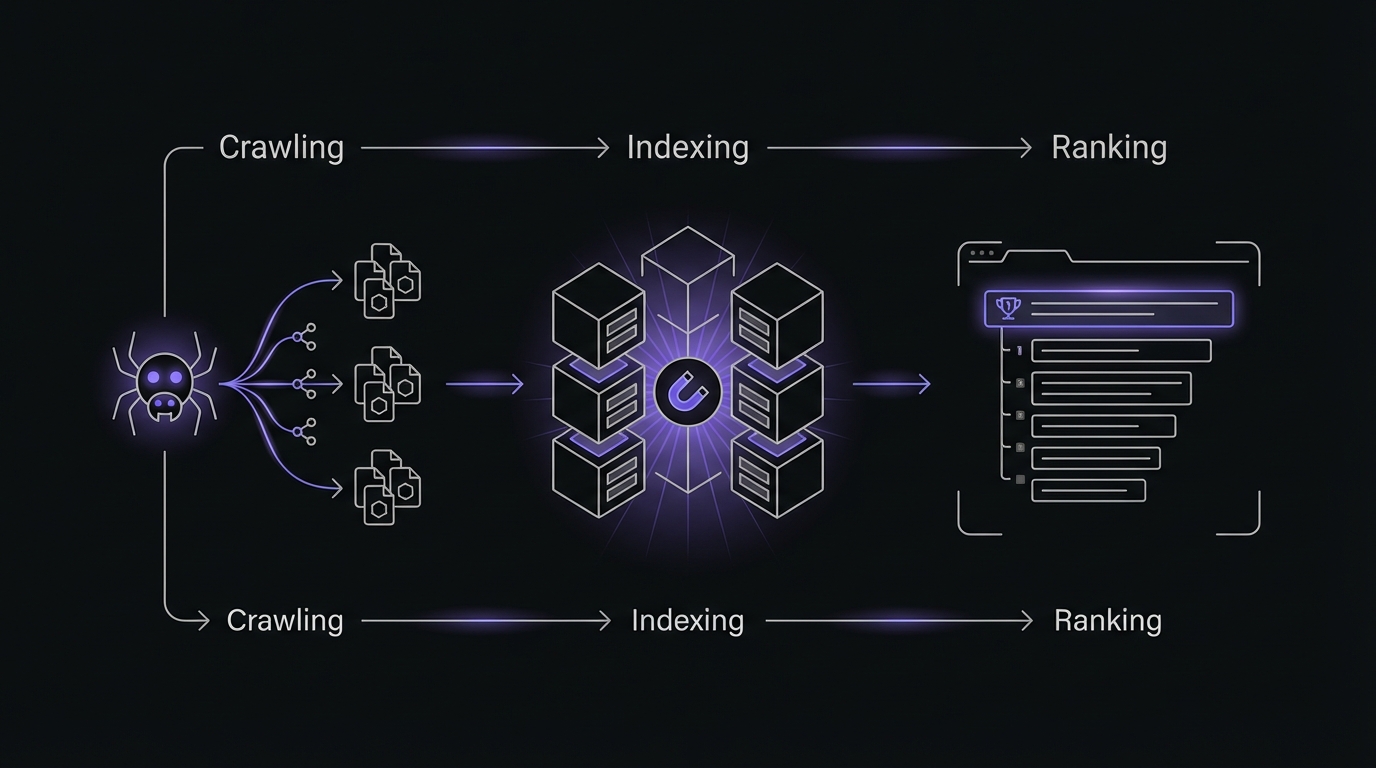
Understanding how search engines work clarifies every SEO decision. Three core processes:
The Three Core Processes
Search engines organize billions of web pages:
Crawling
What it means: Google's bots constantly discover and visit web pages.
Googlebot starts with known pages and follows links to discover new ones. The bot reads your content, follows internal and external links, mapping a vast web of interconnected pages.
Why crawling matters: No crawl = no index = no rank. Common reasons pages don't get crawled:
- No links pointing to the page (orphaned pages)
- Blocked by robots.txt file
- Server errors or slow response times
- Too many layers deep in site structure
- Poor internal linking
Indexing
What it means: After crawling, Google analyzes pages and stores them in the index.
During indexing, Google examines:
- Text content and keywords
- Images and multimedia
- Meta tags (title, description)
- Page structure (headings, lists)
- Links (internal and external)
- Page speed and user experience signals
- Structured data markup
The index is Google's catalog. It records what each page covers for quick retrieval during searches.
Pages might get crawled but not indexed due to:
- Duplicate content (Google already has this information)
- Noindex tags telling Google not to index
- Thin content (too little substance to be useful)
- Technical issues (broken code, rendering problems)
Google Search Console's Index Coverage report shows you exactly which pages are indexed and which aren't, along with reasons for any problems.
Ranking
What it means: Google's algorithm determines which pages to show and in what order.
This is where the magic happens—and where most SEO work focuses. Google uses over 200 ranking factors to evaluate each page's relevance and quality for specific queries. The algorithm considers:
Relevance: Does the page actually answer the searcher's question? Google analyzes keyword usage, topic coverage, and semantic meaning to determine topical relevance.
Authority: How trustworthy and expert is this source? This is measured through backlinks (other sites linking to you), author credentials, and E-E-A-T signals (Experience, Expertise, Authoritativeness, Trustworthiness).
User Experience: Is the page fast, mobile-friendly, and easy to use? Google tracks metrics like page speed, mobile usability, and Core Web Vitals.
Context: Results vary by the searcher's location, device, search history, and the specific query intent.
Rankings fluctuate constantly. Google updates continuously. Don't panic over daily changes; focus on weekly and monthly trends.
Your job: Make content crawlable, indexable, and valuable. Master these three, master SEO fundamentals.
Understanding Search Intent
Google doesn't just match keywords—it understands what searchers want.
Two people searching for "apple" have different needs. One wants fruit nutrition facts; another wants to buy an iPhone. Google figures out intent and delivers appropriate results.
Align your content with search intent. Create a product page when searchers want to buy, a tutorial when they want to learn. Mismatch content type with intent, and you won't rank—no matter how well-optimized.
The Four Types of Search Intent
####Informational
Want: Learn, find answers, understand topics.
Examples:
- "what is SEO"
- "how does Google ranking work"
- "best practices for meta descriptions"
- "why is my website not ranking"
Content that ranks: Comprehensive guides, tutorials, how-to articles, educational resources.
GSC signal: High impressions, 2-5% CTR normal for informational queries.
Optimization: Comprehensive coverage, clear explanations, practical examples, visuals, step-by-step instructions.
Navigational
Want: Find specific website.
Examples:
- "Facebook login"
- "Mailchimp dashboard"
- "Amazon customer service"
- "Nike official site"
Content that ranks: Homepages, login pages, branded pages.
GSC signal: 50-80%+ CTR. Rank #1 if you're the brand, otherwise won't rank.
Optimization: Make branded pages easily findable. Use brand name in titles and content.
Commercial Investigation
Want: Research before buying.
Examples:
- "best SEO tools 2026"
- "Semrush vs Ahrefs comparison"
- "top email marketing platforms"
- "most affordable project management software"
Content that ranks: Product comparisons, reviews, "best of" roundups, pros-cons analysis, buying guides.
GSC signal: 5-15% CTR, lower bounce rates.
Optimization: Comprehensive comparisons with data, criteria, honest assessments. Include pricing, features, pros/cons, use cases.
Transactional
Want: Purchase, signup.
Examples:
- "buy Nike running shoes"
- "hire SEO consultant"
- "subscribe to Netflix"
- "book hotel in Austin"
Content that ranks: Product pages, service pages, pricing pages, signup flows.
GSC signal: Lower volume, dramatically higher conversion rates.
Optimization: Clear product info, pricing transparency, strong CTAs, trust signals, smooth conversion paths.
Why Search Intent Matters
Google recognizes content type mismatches. Product pages won't rank for informational queries—no matter how well-optimized.
Searching "how to do keyword research" returns guides, not tool signup pages. Google knows users want to learn, not buy.
Your GSC Queries report reveals what intent you capture. Are queries aligned with business goals? Adjust strategy if needed.

Action item: Review top 20 GSC queries. Identify intent. Do pages match searcher needs?
Keyword Research Basics
Complete guide: Keyword Research for Beginners.
What Are Keywords?
Keywords are search terms people type into Google. Modern SEO focuses on topics and user needs, not individual keywords.
Google understands synonyms, related concepts, and semantic meaning. Cover the topic comprehensively using natural language—don't repeat keywords unnaturally.
Keyword types:
Short-tail keywords (1-2 words):
- Examples: "SEO", "running shoes", "marketing"
- High search volume, very competitive
- Broad intent, lower conversion rates
- Difficult for new sites to rank
Long-tail keywords (3+ words):
- Examples: "how to do keyword research for small business", "best trail running shoes for beginners"
- Lower search volume per query, less competitive
- Specific intent, higher conversion rates
- Easier to rank, better for building topical authority
Individual long-tail keywords have less volume, but collectively dominate searches. Start with long-tail, build toward short-tail.
Simple Keyword Research Process
Keyword research using free resources:
Step 1: Brainstorm Seed Keywords
Start with business and customer knowledge:
- Products/services offered?
- Problems solved?
- Repeated customer questions?
- What would you search?
Use your customers' language, not jargon. Beginners search "how to get found on Google," not "search engine optimization."
List 10-20 seed keywords as jumping-off points.
Step 2: Use Free Tools to Expand Your List
Google Search Console (Your secret weapon): Go to the Queries report and see what you already rank for. Discover:
- Keywords you didn't even target (bonus traffic!)
- Variations of your seed keywords
- Related queries you hadn't considered
- "Quick win" opportunities where you rank positions 5-15 with decent impressions
Shows actual queries driving real traffic to your site.
Google Autocomplete: Type your seed keyword into Google and note the autocomplete suggestions. These are popular searches based on real user behavior.
Try adding different modifiers:
- "how to [keyword]"
- "[keyword] for [audience]"
- "best [keyword]"
- "[keyword] vs"
People Also Ask: The "People Also Ask" boxes in search results reveal related questions people want answered. These make excellent content topics and long-tail keyword targets.
Related Searches: Scroll to the bottom of Google search results for "Searches related to [your query]." These suggest semantic variations and related topics.
Google Trends: See how search volume changes over time. Identify:
- Seasonal patterns (plan content calendar accordingly)
- Rising vs declining terms (invest in growth areas)
- Geographic differences (localize content if needed)
Step 3: Assess Opportunity
Evaluate three factors for each keyword:
Search Volume - Is anyone searching? Use Ubersuggest or GSC impressions data. Don't obsess over exact numbers.
Rule of thumb: Target 100-500 monthly searches for new sites.
Competition - Can you rank? Analyze first page:
- All major authority sites?
- Thousands of backlinks?
- How comprehensive?
- Established for years?
If all powerhouse sites, too competitive. Look for smaller sites or less comprehensive content.
Intent Alignment - Do searchers want what you offer? Match page type to what's ranking.
Step 4: Prioritize and Plan
Create a simple spreadsheet with columns:
- Keyword/Topic
- Search Volume (High/Medium/Low)
- Competition (High/Medium/Low)
- Intent Type
- Priority (1-5)
- Content Status (Planned/Draft/Published)
Prioritize:
- Quick wins (rank 5-15, high impressions)
- Low-competition long-tail
- Topic clusters
- High-value commercial
Build topical authority: Create content clusters around core topics (pillar + cluster posts) to signal expertise.
Using GSC for Keyword Opportunities
Your Queries report goldmine:
"Almost there" keywords:
- Filter for position 5-15
- Sort by impressions (high)
- These are queries where you're on the bubble of the first page
- Small improvements can yield dramatic traffic increases
Unexpected rankings: Look for queries you rank for but didn't intentionally target. These reveal:
- Topics your audience cares about
- Semantic variations of your main topics
- Content gaps you can expand on
High impressions, low CTR: These queries show visibility but poor click appeal. Usually fixable by:
- Rewriting title tags to be more compelling
- Improving meta descriptions
- Adding structured data for rich results
- Updating publication date for freshness
Declining queries: Compare date ranges to identify keywords losing positions. Investigate:
- Have competitors published better content?
- Is your information outdated?
- Have search trends shifted?
On-Page SEO Fundamentals
On-page SEO is everything you control directly on your website to optimize pages. Most accessible lever for beginners—complete control without waiting for backlinks.
See the complete checklist: On-Page SEO Checklist.
Critical On-Page Elements
Title Tags
What it is: The clickable headline in search results.
Why it matters: Major ranking factor influencing keywords. Also affects click-through rate—compelling titles get clicks from position #3, boring ones get ignored at #1.
Best practices:
- 50-60 characters (Google truncates longer)
- Primary keyword near beginning
- Compelling and benefit-driven
- Brand name at end
- Write for humans, optimize for search
Bad: "Services | Company Name" (generic, no keyword)
Good: "SEO Basics: Complete Beginner's Guide (2026) | [Brand]" (clear topic, keyword, comprehensive)
GSC insight: High impressions + low CTR = optimize title.
Meta Descriptions
What it is: 150-160 character summary below your title in search results.
Why it matters: Meta descriptions are NOT a direct ranking factor—Google has confirmed this. However, they significantly affect CTR, which indirectly influences rankings through user engagement signals.
Best practices:
- 150-160 characters
- Include target keyword (Google bolds matches)
- Compelling value proposition
- Subtle call-to-action
- Specific and accurate
Google rewrites meta descriptions 63% of the time based on query. Write good ones anyway—they're used 37% of the time and set your preferred messaging.
Bad: "Learn about SEO in this article about search engine optimization and ranking on Google." (repetitive, vague)
Good: "Master SEO fundamentals with this beginner-friendly guide. Learn keyword research, on-page optimization, and technical SEO. Track your progress with Google Search Console." (specific benefits, actionable)
Header Tags (H1-H6)
What they are: HTML elements creating content hierarchy.
Why they matter: Help readers and search engines understand content organization. Improve scannability and signal relevance.
Best practices:
- One H1 per page
- H2s for main sections, H3s for subsections
- Include keywords naturally
- Think outline structure
- Descriptive headers
Use logical hierarchy: H1 for main topic, H2 for sections, H3 for subsections.
Content Quality and Relevance
All the technical optimization in the world won't help if your content doesn't serve user needs.
Match search intent: Content format must match searcher needs. How-to queries need tutorials, not product pages.
Comprehensive coverage: Analyze top competitors. Cover all aspects. Google favors content that fully answers queries.
Natural keyword usage: Include your target keyword in:
- Title (H1)
- First 100 words
- A few headers (where natural)
- Throughout content (but never forced)
- URL slug
- Image alt text
But never "keyword stuff" (unnaturally repeating keywords). Write naturally and comprehensively—keyword variations will happen organically.
Answer questions directly: Clear, concise answers. FAQ sections. Direct formats favor voice search and featured snippets.
Use examples and data: Specific examples, data, case studies, visuals make content memorable and linkable.
Keep current: Add dates. Refresh annually with new data and insights. Google favors fresh content.
Internal Linking
What it is: Links from one page on your site to another page on your site.
Why it matters:
- Helps Google crawl pages
- Distributes ranking power
- Establishes hierarchy
- Keeps users engaged
- Builds topical authority
Best practices:
- Link naturally within content
- Descriptive anchor text
- Link to important pages from supporting content
- Create hub pages
- 3-5 contextual links per article
GSC insight: Distribute link authority from high-authority pages to priority pages.
Image Optimization
Why it matters: Improve UX and can drive image search traffic. Unoptimized images slow page load.
Best practices:
Descriptive file names: Use keyword-relevant-description.jpg, not IMG_1234.jpg. Google reads file names.
Alt text: Describe the image for accessibility and context. Include relevant keywords naturally, but prioritize accurate description for visually impaired users.
Example: alt="Google Search Console Performance Report showing organic traffic growth over 6 months"
Compress file sizes: Large images kill page speed. Use tools like TinyPNG or ImageOptim to reduce file size without losing visible quality. Aim for under 100KB for most images.
Use appropriate formats:
- JPG for photos
- PNG for graphics, logos (need transparency)
- WebP for best compression (modern format)
- SVG for simple graphics and icons
Lazy loading: Load images only as users scroll near them. Most modern CMS platforms enable this by default.
Relevant images: Don't add stock photos just to have images. Use visuals that actually support content—diagrams, screenshots, charts, infographics.
URL Structure
What it is: The web address for each page (the slug after your domain).
Why it matters: URLs signal page content to users and search engines. Clean, descriptive URLs improve CTR and are easier to share.
Best practices:
- Keep URLs short and descriptive
- Include your target keyword when natural
- Use hyphens to separate words (not underscores)
- Use lowercase only
- Avoid unnecessary parameters, dates, or numbers
- Create a logical hierarchy:
yourdomain.com/category/subcategory/page
Bad examples:
yourdomain.com/page?id=12345&session=abcdefyourdomain.com/2026/01/21/this-is-my-blog-post-about-seo-basics-and-how-to-optimize
Good examples:
yourdomain.com/seo-basics-guideyourdomain.com/guides/seo-basics
Important: Once a page is published and ranking, don't change the URL without implementing proper redirects (301 redirect). Changing URLs without redirects loses all accumulated ranking power.
On-Page SEO Checklist
Before publishing any page, verify:
- Title tag includes primary keyword and is compelling (50-60 chars)
- Meta description provides clear value prop (150-160 chars)
- H1 clearly states page topic
- Content comprehensively covers topic
- Target keyword appears naturally in first 100 words
- Headers (H2, H3) create logical structure
- 3-5 internal links to related content
- Images have descriptive file names and alt text
- Images compressed for fast loading
- URL is short, descriptive, includes keyword
- Content matches search intent
- Mobile-friendly formatting (short paragraphs, plenty of white space)
Using GSC to Find On-Page Opportunities
Your Pages report reveals optimization opportunities:
High impressions + low CTR: Your page ranks well (visibility) but doesn't get clicked. Usually indicates poor title/meta description. Users see you but choose competitors.
Good rankings but declining clicks: Content may be outdated or competitors published something better. Time for a refresh.
Many impressions at positions 8-15: You're on the bubble. Small on-page improvements (better title, more comprehensive content, better structure) could push you to first page, dramatically increasing traffic.
Filter by page and review queries: See all queries a page ranks for. Are there opportunities to expand content to target related queries?
For a complete on-page SEO checklist with technical details and advanced optimization techniques, see: On-Page SEO Checklist: The Essentials That Actually Matter
Technical SEO Essentials
If on-page SEO is about making your content useful and relevant, technical SEO is about making sure search engines can find, crawl, and index that content in the first place.
Think of technical SEO as the foundation of a house. Beautiful interior design (content) doesn't matter if the foundation is cracked. The good news: most technical issues are visible in Search Console and fixable without a developer.
Need help with the technical side? For a detailed walkthrough of common technical issues and how to fix them without a developer, read Technical SEO Basics: What You Need to Know.
What Is Technical SEO?
Technical SEO ensures search engines can:
- Discover your pages (crawlability)
- Access and read your content (indexability)
- Understand your site structure
- Deliver fast, secure experiences to users
It's the behind-the-scenes infrastructure that enables everything else. Don't let "technical" intimidate you—many fixes are straightforward once you know what to look for.
Core Technical SEO Elements
Site Architecture
What it is: How your pages are organized and connected.
Why it matters: Logical architecture helps Google understand your content relationships and efficiently crawl your site. It also improves user experience by making content easy to find.
Best practices:
Flat architecture: Important pages should be within 3 clicks of your homepage. The deeper pages are buried, the less likely they'll be crawled and the less authority they'll have.
Example structure:
Homepage
└── Category 1
    └── Subcategory
        └── Individual Page
Logical hierarchy: Group related content together. Use categories and subcategories that make sense to users and search engines.
Strong internal linking: Connect related pages within content (not just navigation menus). This helps Google discover pages and understand relationships.
GSC insight: The Crawl Stats report shows how many pages Google crawls daily. If it's not crawling many pages, your architecture might be too deep or your internal linking weak.
XML Sitemaps
What it is: An XML file listing all important pages on your site, helping search engines discover and prioritize content.
Why it matters: Sitemaps ensure Google knows about all your pages, especially new content or pages not well-linked internally.
Best practices:
- Include all important pages you want indexed
- Exclude pages you don't want indexed (thank you pages, admin pages)
- Update automatically when you publish new content (most CMS plugins handle this)
- Keep sitemaps under 50,000 URLs (split large sites into multiple sitemaps)
- Include last modified date for each URL
Where to submit: In Google Search Console under "Sitemaps." Submit once; Google will check it regularly for updates.
Common sitemap locations:
yourdomain.com/sitemap.xmlyourdomain.com/sitemap_index.xml
Most website platforms (WordPress, Shopify, Wix, etc.) generate sitemaps automatically. Check your platform's documentation.
Robots.txt
What it is: A text file telling search engines which parts of your site NOT to crawl.
Why it matters: Robots.txt helps you:
- Save crawl budget by blocking unimportant pages
- Prevent duplicate content issues
- Keep private sections from being indexed
Common mistake: Accidentally blocking important content. This is one of the top reasons pages don't get indexed.
Where it lives: yourdomain.com/robots.txt
Basic structure:
User-agent: *
Disallow: /admin/
Disallow: /private/
Sitemap: https://yourdomain.com/sitemap.xml
This tells all bots (*) not to crawl /admin/ or /private/ directories, and points them to your sitemap.
GSC tool: Use the robots.txt tester in Search Console to verify you're not accidentally blocking important pages.
Important: Robots.txt prevents crawling but doesn't prevent indexing. If pages are linked from external sites, Google might still index them (without crawling). To prevent indexing, use noindex meta tags instead.
Page Speed
What it is: How fast your pages load for users.
Why it matters: Page speed is a direct ranking factor. More importantly, slow pages frustrate users—53% of mobile users abandon sites that take over 3 seconds to load.
Core Web Vitals: Google's specific page experience metrics:
Largest Contentful Paint (LCP): How long until the main content loads
- Good: <2.5 seconds
- Needs Improvement: 2.5-4 seconds
- Poor: >4 seconds
First Input Delay (FID): How quickly the page responds to first interaction
- Good: <100 milliseconds
- Needs Improvement: 100-300ms
- Poor: >300ms
Cumulative Layout Shift (CLS): How much content jumps around while loading
- Good: <0.1
- Needs Improvement: 0.1-0.25
- Poor: >0.25
Quick wins for page speed:
- Compress images (biggest impact for most sites)
- Minimize CSS and JavaScript
- Enable browser caching
- Use a CDN (Content Delivery Network) for faster global delivery
- Minimize third-party scripts (ads, tracking, widgets)
- Upgrade hosting if server response is slow
GSC report: The Page Experience report shows which pages have Core Web Vitals issues. Focus on fixing pages with high traffic first.
Mobile Optimization
What it is: Ensuring your site works perfectly on smartphones and tablets.
Why it matters: Google uses mobile-first indexing, meaning it primarily uses the mobile version of your site for ranking and indexing. If your mobile site is broken, your rankings suffer—even for desktop searchers.
Best practices:
Responsive design: Site automatically adapts to any screen size. This is the standard approach and what Google recommends.
Mobile usability basics:
- Text large enough to read without zooming (16px minimum)
- Tap targets (buttons, links) large enough and spaced apart (48px minimum)
- Content fits screen width (no horizontal scrolling)
- No Flash or unsupported plugins
Test your mobile experience:
- Google's Mobile-Friendly Test: Quick check for mobile issues
- GSC Mobile Usability report: Shows specific problems Google found
- Test on actual devices: Desktop simulations miss real-world issues
Common mobile issues:
- Tiny text requiring zoom
- Clickable elements too close together
- Content wider than screen
- Intrusive popups blocking content
GSC connection: The Mobile Usability report in Search Console identifies mobile-specific problems. Fix these before worrying about advanced optimizations.
HTTPS Security
What it is: SSL certificate encrypting the connection between user and server (the "padlock" in browser address bar).
Why it matters:
- Confirmed ranking factor since 2014
- Browsers show scary warnings for non-HTTPS sites
- Required for many modern web features
- User trust signal (especially for e-commerce)
Implementation: Get an SSL certificate from your hosting provider (often free through Let's Encrypt) and redirect all HTTP traffic to HTTPS.
Verify in GSC: Make sure you've verified both HTTP and HTTPS versions of your site, and set up proper redirects.
Important: When migrating HTTP to HTTPS, implement 301 redirects and update your sitemap. Monitor GSC for any indexing issues during the transition.
Structured Data
What it is: Special code (usually JSON-LD format) that helps search engines understand specific types of content.
Why it matters: Structured data enables rich results—enhanced search listings that stand out and typically get higher CTR:
- Star ratings for reviews
- Recipe details (time, calories, ratings)
- FAQ expandable sections
- How-to step-by-step
- Product pricing and availability
- Event dates and locations
Common types for most sites:
- Article (for blog posts and guides)
- Organization (for your company)
- Local Business (for location-based businesses)
- Product (for e-commerce)
- FAQ (for Q&A content)
Implementation: Add structured data to your pages' HTML. Most CMS platforms have plugins that generate it automatically (like Yoast SEO for WordPress).
Testing: Use Google's Rich Results Test to verify your structured data is correct.
GSC report: The Enhancements section shows errors with your structured data. Fix these to maintain rich result eligibility.
Reality check: Structured data doesn't guarantee rich results, but it makes you eligible. Google displays rich results when it determines they improve user experience for specific queries.
Index Coverage
What it is: Which pages Google has successfully indexed and which it hasn't.
Why it matters: If pages aren't in Google's index, they can't rank. Period.
Common indexing issues:
- Blocked by robots.txt: You accidentally told Google not to crawl the page
- Noindex tag: Page has a meta tag telling Google not to index it
- Crawled but not indexed: Google crawled the page but decided not to index it (usually thin or duplicate content)
- 404 errors: Page doesn't exist or returns an error
- Redirect chains: Multiple redirects slow crawling and dilute authority
- Duplicate content: Google already has similar content indexed
GSC Index Coverage report: Your diagnostic dashboard showing:
- Valid pages (successfully indexed)
- Valid with warnings (indexed but with issues)
- Excluded pages (crawled but not indexed)
- Error pages (couldn't be crawled or indexed)
Action items:
- Review error pages—these should usually be fixed
- Check excluded pages—make sure important pages aren't excluded
- Monitor trends—sudden drops in indexed pages signal problems
Fix indexing issues before worrying about rankings. An unindexed page at position #0 gets zero traffic, while an indexed page at position #30 can at least improve over time.
Using GSC as Your Technical SEO Dashboard
Search Console is essentially your technical SEO control panel:
Index Coverage: See what's indexed and what's not, with reasons for problems. This should be your first stop for troubleshooting.
Page Experience: Check Core Web Vitals scores. Filter by mobile vs desktop, and prioritize fixing high-traffic pages.
Mobile Usability: Identify mobile-specific issues preventing good user experience.
Sitemaps: Submit sitemaps and monitor processing status. Google shows how many URLs were discovered vs indexed.
URL Inspection: Debug individual page issues. Enter any URL to see:
- Is it indexed?
- When was it last crawled?
- What's the mobile vs desktop version?
- Are there any indexing or mobile issues?
- Can you request indexing?
Crawl Stats: Monitor how Google's bot interacts with your site. Sudden changes in crawl rate can signal problems.
Most technical SEO problems are visible in Search Console before they hurt your rankings. Check it weekly to catch issues early.
For a comprehensive technical SEO deep dive, including advanced topics like JavaScript rendering, international SEO, and site migrations, see: Technical SEO Basics: What You Need to Know
Off-Page SEO and Link Building
You've optimized your content (on-page SEO) and fixed your technical foundation. Now comes the hardest but perhaps most important aspect: building authority through off-page SEO.
Want to build quality backlinks? For practical strategies on earning links ethically and effectively, including outreach templates and what to avoid, read Link Building 101: How Backlinks Impact Rankings.
What Is Off-Page SEO?
Off-page SEO encompasses everything outside your website that affects your rankings. While this includes brand mentions, social signals, and reviews, the primary focus is backlinks—links from other websites to yours.
Think of backlinks as votes of confidence. When reputable sites link to your content, they're essentially telling Google, "This content is valuable and trustworthy." Google's entire algorithm originally revolved around this concept (PageRank), and backlinks remain one of the top three ranking factors.
Understanding Backlinks
What Are Backlinks?
A backlink is a link from an external website to yours. Quality matters far more than quantity.
Why backlinks matter:
- Signal authority to Google
- Drive referral traffic
- Help Google discover pages
- Can't fully control (making them valuable signals)
Quality Over Quantity
One authoritative link from The New York Times beats 100 spam links. Bad links hurt you.
Quality backlink factors:
Authority of linking domain: Links from trusted sites (Wikipedia, .edu/.gov, major publications) carry more weight.
Relevance: Links from sites in your industry or topical area matter more than unrelated links. If you're a plumber, a link from a home improvement blog is more valuable than one from a dog grooming site.
Editorial placement: Links within the main content (editorial links) are strongest. Footer links, sidebar links, and comment links carry less weight.
Anchor text: The clickable text of the link provides context. Descriptive anchor text (like "comprehensive SEO guide for beginners") is stronger than generic text (like "click here"). However, natural link profiles have diverse anchor text—exact-match anchors in every link looks manipulative.
DoFollow vs NoFollow:
- DoFollow links pass authority (default)
- NoFollow links don't pass authority directly (marked with rel="nofollow")
- Both types have value—nofollow links still drive traffic and look natural
- Natural link profiles have a mix of both
Warning signs of bad links:
- Links from obviously spammy sites
- Links from completely unrelated industries
- Links from link farms or private blog networks (PBNs)
- Excessive exact-match anchor text
- Sudden influx of thousands of links
Google's Penguin update (now part of core algorithm) penalizes manipulative link building. Bad links can actively harm your rankings.
Natural Link Building Strategies
The key word here is "natural." Focus on earning links rather than building them through schemes.
Create Link-Worthy Content
The foundation of all link building is content worth linking to. Certain content types naturally attract links:
Original research and data: Studies, surveys, and statistics that others cite. Example: "We analyzed 10,000 search results and found that pages with video get 41% more clicks."
Comprehensive guides: In-depth resources like this guide become reference materials others link to when discussing the topic.
Tools and calculators: Interactive resources that provide value. Examples: ROI calculators, SEO audit tools, template generators.
Infographics and visual data: Shareable visuals that other sites embed (with credit links).
Contrarian or unique perspectives: Challenge conventional wisdom with well-reasoned arguments backed by data.
Case studies: Real results and specific examples that prove concepts work.
The "link magnet" question: Before creating content, ask "Why would someone link to this?" If you can't answer, the content probably won't earn many links.
Build Relationships
Link building is ultimately about relationship building:
Guest posting: Write valuable content for relevant sites in your industry. Include a natural link back to related content on your site. Focus on quality over quantity—one post on a respected site beats ten on low-quality blogs.
Podcast appearances: Get interviewed on industry podcasts. Many include links in show notes or transcripts.
Industry partnerships: Collaborate with complementary businesses. Partnerships often result in natural linking.
Supplier/customer relationships: B2B companies can often earn links from clients (case studies) or suppliers (partner directories).
Important: Focus on building genuine relationships, not transactional link exchanges. Think long-term.
Promote Your Content
Great content doesn't market itself. Promotion is essential:
Social media: Share content where your audience hangs out. While social links are typically nofollow, social promotion leads to visibility and eventual backlinks.
Email outreach: Reach out to people who would genuinely benefit from your content:
- Authors who've written on similar topics
- Sites that linked to similar (but inferior) content
- People you mentioned or quoted in your content
Make outreach personal and value-focused, not spammy:
- Explain why your content would benefit their audience
- Show you're familiar with their work
- Make your ask clear but not pushy
Industry directories: Submit to legitimate directories in your industry. Focus on quality, curated directories, not low-quality link farms.
Forums and Q&A sites: Provide genuinely helpful answers on Reddit, Quora, industry forums. Include links when they add value to your answer. Don't spam.
Earn Media Coverage
HARO (Help a Reporter Out): Journalists use HARO to find expert sources. Respond to relevant queries with valuable insights. If quoted, you often get a backlink.
Press releases: Announce genuinely newsworthy events (major product launches, significant research, important hires). Don't spam press releases for every minor update.
Case studies and success stories: Partner with customers or clients to publish success stories. Both parties typically link to these.
Industry awards: Apply for relevant industry awards. Winners and nominees often get linked from the awarding organization and news coverage.
What to Avoid
These tactics violate Google's guidelines and risk penalties:
Buying links: Paying for backlinks violates Google's Webmaster Guidelines. Google is sophisticated at detecting paid link schemes.
Link exchanges: "I'll link to you if you link to me" agreements are low-value and easily detected at scale.
Link farms and PBNs: Networks of sites created solely to link to each other. Google actively penalizes these.
Excessive reciprocal linking: Some mutual linking is natural, but excessive reciprocity looks manipulative.
Automated link building: Tools that automatically create links (blog comment spam, forum spam, etc.) create worthless, harmful links.
Negative SEO: Sometimes competitors build spam links to your site hoping to hurt you. Monitor your backlink profile and disavow truly harmful links through GSC's Disavow tool (use sparingly).
Beyond Backlinks
Brand Mentions
Unlinked brand mentions (when sites mention your brand without linking) also signal authority. Google can recognize these and factor them into rankings.
Monitor brand mentions with Google Alerts or mention tracking tools. Reach out to politely ask for a link when appropriate.
E-E-A-T Signals
Google's Quality Rater Guidelines emphasize E-E-A-T:
Experience: Demonstrable first-hand experience with the topic. Show you've actually done what you're writing about.
Expertise: Credentials, qualifications, and demonstrated knowledge. Author bios, about pages, and credentials matter.
Authoritativeness: Industry recognition, citations from other experts, speaking engagements, publications.
Trustworthiness: Accuracy, transparency, clear contact information, security (HTTPS), positive reviews.
Build E-E-A-T through:
- Detailed author bios with credentials
- Clear contact information and about pages
- Accurate, well-sourced content
- Security and privacy policies
- Positive reviews and testimonials
Using GSC to Monitor Backlinks
Search Console's Links report provides valuable backlink data:
Top external sites: Who's linking to you most? Analyze these sites:
- Are they relevant to your industry?
- Are they authoritative?
- Can you replicate what earned those links?
Your most-linked pages: Which content naturally attracts links? Create more content like this. Look for patterns in what earns links.
Top linking text: What anchor text do sites use when linking to you? A natural profile has diverse anchor text including:
- Branded terms (your company name)
- Naked URLs (yourdomain.com)
- Generic phrases (click here, read more)
- Descriptive, varied keyword phrases
Internal link structure: See which pages get the most internal links. Make sure your important "money pages" are well-linked internally.
Action items based on GSC Links data:
- Identify successful content that earns links (create more like it)
- Find linking patterns (who links to competitors in your space?)
- Monitor for spammy links (disavow if necessary)
- Ensure important pages receive adequate internal linking
Limitation: GSC shows a sample of backlinks, not comprehensive data. For complete backlink analysis, consider tools like Ahrefs, Semrush, or Moz (paid tools).
Key principle: Earn backlinks through quality content, smart promotion, and relationships. Create the best resource on your topic, then promote it.
Content Strategy for SEO
Why Content Is the Foundation
Technical optimization and backlinks don't matter if your content doesn't deserve to rank.
Every aspect of SEO revolves around content:
Content gives Google something to rank: Without valuable, relevant content, there's nothing to optimize. Technical perfection on a thin, useless page won't rank.
Quality content attracts backlinks naturally: The best link building strategy is creating content so good that people naturally reference and share it.
Comprehensive coverage builds topical authority: Google rewards sites that deeply cover specific topics, not sites with random articles on disconnected subjects.
Content addresses search intent: When your content perfectly matches what searchers need, Google rewards you with rankings, and users reward you with conversions.
Creating SEO-Friendly Content
Topic Clusters (Pillar-Cluster Model)
Modern content strategy organizes around topic clusters rather than isolated keywords:
Pillar pages: Comprehensive guides covering broad topics (like this guide). They link to related cluster content and serve as your authoritative hub on the topic.
Cluster posts: Detailed articles on specific subtopics that link back to the pillar page. They provide depth on aspects briefly covered in the pillar.
Example structure:
- Pillar: "SEO Basics: A Practical Guide for Beginners"
- Cluster: "Keyword Research for Beginners"
- Cluster: "On-Page SEO Checklist"
- Cluster: "Technical SEO Basics"
- Cluster: "Link Building 101"
- Cluster: "Local SEO Guide"
Why this works:
- Signals topical authority to Google (you're an expert, not a dabbler)
- Internal linking creates strong relationships between related content
- Comprehensively serves user needs (pillar for overview, clusters for depth)
- Keeps users on your site longer (internal linking paths)
Implementation: Identify your core topics (usually your main products, services, or expertise areas). Create comprehensive pillar pages for each, then support with detailed cluster posts.
Content Types That Rank
Different content formats work for different intents and queries:
Ultimate guides: Comprehensive resources (2,000-10,000 words) covering topics thoroughly. Great for competitive, informational keywords.
How-to tutorials: Step-by-step instructions solving specific problems. High engagement and natural link magnets.
Comparison posts: Helping buying decisions by comparing options. Strong for commercial investigation intent.
Case studies: Demonstrating real results and specific implementations. Build trust and attract quality backlinks.
Data-driven research: Original studies, surveys, and analysis. These are link magnets—journalists and bloggers cite unique data.
Tools and templates: Interactive resources or downloadable assets. High utility drives links and brand awareness.
Listicles: "Top 10" or "Best of" posts. Often criticized but effective when done with depth and unique insights.
Choose format based on search intent: Analyze what's currently ranking for your target keyword. Google's results reveal what format users expect.
Content Optimization Process
Step 1: Research
Identify target keyword and intent: What are you targeting, and what do searchers actually want?
Analyze top-ranking competitors: Review the first page results:
- What format do they use?
- How comprehensive are they?
- What topics do they cover?
- What's missing (your opportunity)?
- How many words (general range)?
- What multimedia do they include?
Find content gaps: What questions aren't being answered? What perspectives are missing? What could you add that would make your content more valuable?
Gather data, examples, and sources: Collect specific statistics, expert quotes, case studies, and examples. Generic advice is forgettable; specific data is shareable.
Step 2: Create
Write for humans first, optimize for search second: Never sacrifice readability for keyword stuffing. Engage readers with clear, helpful writing.
Cover topics comprehensively: Don't write 500 words when the topic demands 2,500. Match or exceed the depth of top-ranking competitors. Google favors thorough coverage.
Use clear structure:
- Logical header hierarchy (H2, H3 outline)
- Short paragraphs (2-4 sentences for web reading)
- Bulleted and numbered lists for scannability
- Plenty of white space
Include visuals, examples, and data:
- Screenshots demonstrating concepts
- Diagrams explaining processes
- Charts showing data
- Real examples, not hypotheticals
Add internal links: Link to 3-5 related pieces of content on your site. Use descriptive anchor text that previews the destination.
Answer questions directly: Include an FAQ section if appropriate. Direct question-answer formats work well for voice search and featured snippets.
Step 3: Optimize
Once the content is written, layer on optimization:
Target keyword placement:
- Include in title (H1)
- Include in first 100 words
- Include in 1-2 headers (where natural)
- Sprinkle naturally throughout (don't force it)
- Include in URL slug
- Include in image alt text
Write compelling title and meta description: Follow best practices from the On-Page SEO section. Make it click-worthy, not just keyword-stuffed.
Add alt text to images: Describe images accurately for accessibility and SEO.
Ensure mobile-friendly formatting:
- Short paragraphs
- Readable font sizes
- Adequate spacing
- No horizontal scrolling
Check page speed: Compress images, minimize scripts, test load time.
Add structured data: Implement Article schema at minimum. Add FAQ, HowTo, or other relevant schema types.
Step 4: Publish and Promote
Content doesn't market itself:
Share on social media: Where does your audience hang out? LinkedIn for B2B, Twitter for tech, Pinterest for visual industries, etc.
Email to subscribers: If you have an email list, send your new content to them. Your existing audience is most likely to engage and share.
Reach out to relevant sites: Email people who:
- Might find it valuable to share
- You mentioned or quoted
- Have linked to similar content
Update related content: Add internal links from existing content to your new piece.
Step 5: Monitor and Improve
Content optimization isn't one-and-done:
Track performance in GSC:
- Which keywords is it ranking for?
- What's the average position?
- How's the CTR compared to position benchmarks?
- Is it getting impressions but no clicks?
Monitor engagement in Analytics:
- How long do users stay on page?
- What's the bounce rate?
- Do they click internal links?
- Are they converting?
Update based on performance:
- Add sections covering related queries you're ranking for
- Improve titles/descriptions if CTR is low
- Expand thin sections that need more depth
- Update outdated information, examples, and screenshots
Content refresh strategy: Annually review your top content. Update:
- Statistics and data
- Examples and screenshots
- Publication/update date
- New sections based on related queries
- Broken links
Content Freshness
Google favors recently published and updated content for many queries:
Regular updates signal active maintenance: Sites that consistently improve content appear more trustworthy than abandoned ones.
Add new sections: As your topic evolves, expand your content to cover new aspects.
Update outdated information: Old statistics, deprecated techniques, or outdated examples hurt credibility.
Mark update dates: Include "Last updated: [date]" at the top. This signals freshness to both users and search engines.
Republish vs update: For major refreshes, consider updating the publication date. For minor updates, just change the "last updated" date.
Using GSC to Guide Content Strategy
Queries report insights:
- Find topics you're "almost" ranking for (positions 5-15)
- Discover related queries to expand coverage
- Identify declining queries needing content updates
Pages report insights:
- Identify successful content formats to replicate
- Find underperforming pages needing optimization
- See which pages drive the most traffic
Search Appearance:
- Which content formats earn featured snippets?
- Which pages appear in other rich results?
- Learn what types of content work for your site
Date comparisons: Track content performance over time. Did that update improve rankings? Is seasonal content performing as expected?
Key principle: Publish consistently (quality over quantity), think in topic clusters not isolated keywords, and let data guide your priorities. Update existing content before creating new content for the same topic.
Measuring SEO Success
SEO without measurement is guesswork. You need data to understand what's working, what's not, and where to focus your efforts.
Key SEO Metrics to Track
In Google Search Console (Primary Tool)
GSC should be your SEO measurement home base. If you haven't set it up yet, follow our step-by-step guide: How to Set Up Google Search Console.
Clicks
What it measures: Total clicks from organic search to your site.
Why it matters: This is the bottom line—actual traffic, not just visibility. Clicks directly correlate with business results.
How to use it:
- Track overall trend (up is good)
- Break down by page (what's driving traffic?)
- Break down by query (what searches convert?)
- Set baseline and monitor week-over-week, month-over-month
Typical ranges: Varies wildly by site size and industry. Focus on your own trend direction, not comparing to others.
Impressions
What it measures: How often your site appeared in search results, whether clicked or not.
Why it matters: Impressions are a leading indicator—visibility precedes clicks. Growing impressions mean you're showing up for more queries.
How to use it:
- High impressions + low clicks = CTR opportunity
- Growing impressions = expanding visibility (even before clicks increase)
- Declining impressions = losing rankings or search volume
Click-Through Rate (CTR)
What it measures: Percentage of impressions that result in clicks (Clicks ÷ Impressions × 100).
Why it matters: CTR reveals how compelling your search listings are. Good rankings with poor CTR means you're losing traffic to competitors.
Typical CTR by position (organic results):
- Position 1: 28-32%
- Position 2: 15-20%
- Position 3: 10-13%
- Position 4-5: 7-9%
- Position 6-10: 3-5%
- Position 11-20: <2%
How to use it: Compare your actual CTR to expected CTR for your position. Significantly underperforming? Optimize your title and meta description.
Important: CTR varies by query type. Branded queries often have 50%+ CTR, while generic informational queries might be 2-3% even at position #1.
Average Position
What it measures: Your average ranking position across all queries.
Why it matters: Tracks your overall visibility. Position 1-10 means first page; that's the goal.
Important context:
- Position fluctuates daily (don't panic over daily changes)
- Track trends over weeks/months, not days
- Average position across all queries isn't always meaningful (you might rank #1 for low-volume and #50 for high-volume)
- Filter by specific queries or pages for actionable insights
Index Coverage
What it measures: How many of your pages are successfully indexed by Google.
Why it matters: Unindexed pages can't rank. Sudden drops in indexed pages signal serious problems.
What to monitor:
- Error count (pages that should be indexed but aren't)
- Total valid pages (successfully indexed)
- Excluded pages (make sure important pages aren't excluded)
Red flags: Sudden drops in indexed pages often indicate:
- Server problems
- New robots.txt blocking content
- Noindex tags accidentally added
- Algorithm penalties
Core Web Vitals
What it measures: Page speed and user experience metrics.
Why it matters: Direct ranking factor and user experience impact.
Key metrics:
- LCP (Largest Contentful Paint): <2.5s is good
- FID (First Input Delay): <100ms is good
- CLS (Cumulative Layout Shift): <0.1 is good
How to use it: Focus on improving URLs marked "poor" or "needs improvement," especially high-traffic pages.
In Google Analytics (Supporting Data)
While GSC is your primary SEO tool, Google Analytics provides additional context:
Organic Traffic
What it measures: Users arriving from organic search (vs total traffic from all sources).
Why it matters: Shows SEO's contribution to overall traffic. Track the percentage of total traffic from organic to see if you're too dependent on any single channel.
Segments to analyze:
- Landing pages (which pages drive organic traffic?)
- Behavior flow (how users navigate after landing)
- Goal completions (are organic visitors converting?)
Engagement Metrics
What they measure: How users interact with your content.
Key metrics:
- Average engagement time (replaces "bounce rate" in GA4)
- Pages per session (do users explore more content?)
- Scroll depth (do users read your content?)
Why they matter: High rankings mean nothing if users immediately leave. Poor engagement might signal intent mismatch or poor user experience.
Conversions
What they measure: Desired actions taken by organic visitors.
Examples:
- Email signups
- Product trials started
- Purchases or leads generated
- Form submissions
- Phone calls
Why they matter: Traffic is a means to an end. Conversions are the end. A page getting 100 organic visitors with 10 conversions is more valuable than a page getting 1,000 visitors with 5 conversions.
Calculate ROI: Track revenue or value attributed to organic search. This justifies SEO investment and guides strategy.
Setting Realistic Expectations
Timeline for Results
Be realistic about SEO timelines to avoid frustration and premature strategy changes:
New sites (less than 6 months old):
- Months 1-3: Indexing, establishing presence, minimal traffic
- Months 4-6: Beginning to rank for long-tail keywords
- Months 7-12: Building momentum, first page rankings for targeted keywords
- Year 2+: Compounding growth, authority established
Established sites (1+ years old):
- Months 1-3: Technical fixes, content updates, baseline established
- Months 4-6: Seeing impact of changes, ranking improvements
- Months 7-12: Consistent traffic growth, authority building
Competitive keywords: Longer timelines. Ranking for "SEO" might take years; ranking for "SEO for Austin tree removal companies" might take 3 months.
Low-competition niches: Faster results possible. Small, focused markets with less competition can show results in 2-3 months.
Important: These are general ranges. Your results depend on competition, starting point, content quality, and execution consistency.
What Success Looks Like Month by Month
Months 1-3: Foundation
- All technical issues resolved (indexing, mobile, speed)
- GSC and Analytics set up and monitoring
- Baseline metrics established
- First content published and optimized
- Small upticks in impressions (leading indicator)
Months 4-6: Early Traction
- Rankings improving for long-tail keywords
- First page rankings for less competitive terms
- Noticeable traffic increases from baseline
- Some content earning backlinks naturally
- Quick wins from optimizing existing pages
Months 7-12: Building Momentum
- Consistent ranking improvements
- First page rankings for target keywords
- Steady traffic growth month-over-month
- Content starting to compound (older content continuing to rank)
- Brand queries increasing
Year 2+: Compounding Returns
- Authoritative rankings for competitive keywords
- Established topical authority in your niche
- Traffic growth accelerating (compound effect)
- Consistent leads/conversions from organic
- SEO becomes primary traffic channel
Red Flags to Watch
Sudden traffic drops: Could indicate:
- Manual action penalty (check GSC Manual Actions report)
- Algorithm update hitting your site
- Technical issues (indexing problems)
- Competitor publishing better content
- Seasonal fluctuation (check year-over-year, not just month-over-month)
Rankings improving but clicks declining: CTR problem. Your titles and descriptions aren't compelling compared to competitors.
High bounce rate on organic traffic: Intent mismatch. Users don't find what they expected. Review:
- Is your content actually answering the query?
- Are you ranking for irrelevant keywords?
- Is user experience poor (slow, confusing navigation)?
Traffic from irrelevant keywords: You're ranking and getting traffic, but it's not your target audience. Refocus content on business-relevant topics.
Stagnant rankings: Stuck at position 8-12 for months? You might need:
- More comprehensive content
- Better backlinks
- Improved user experience
- Fresh updates to content
Building a Simple Monitoring Routine
Don't obsess over daily changes, but do monitor regularly:
Weekly (5 minutes):
- Check GSC Performance report for major anomalies
- Quickly scan for sudden traffic drops or spikes
- Review Index Coverage for new errors
Monthly (30 minutes):
- Compare current month to previous month (clicks, impressions, rankings)
- Identify top-performing new content
- Identify underperforming pages needing attention
- Review queries report for new opportunities
- Check Core Web Vitals for any degradation
Quarterly (2-3 hours):
- Deep dive into top-performing pages (what's working?)
- Deep dive into bottom-performing pages (what needs fixing?)
- Review backlink profile for growth and quality
- Comprehensive technical SEO audit
- Compare to same quarter last year (seasonal adjustment)
- Strategy adjustment based on what's working
Annual (full day):
- Year-over-year comparison and trend analysis
- Major content audit and refresh
- Competitive landscape analysis
- Goal setting for next year
- Budget and resource allocation
Key principle: Track trends over time, not day-to-day fluctuations. Focus on traffic and conversions, not just vanity metrics. Use data to guide decisions, but don't become paralyzed by analysis.
Common SEO Mistakes to Avoid
Most SEO failures stem from misconceptions, shortcuts, or outdated advice. Here are the most common mistakes beginners make—and how to avoid them.
Beginner Mistakes
1. Ignoring Search Intent
The mistake: Creating content you want to rank for without considering what searchers actually need.
Why it fails: Google's primary goal is satisfying user intent. If your content type doesn't match what users want, you won't rank—period. Creating a product page to target an informational keyword, or a blog post to target a transactional keyword, won't work.
Example: Targeting "what is CRM software" with a product sales page. Users want a definition and education, not a sales pitch. Create a comprehensive guide, then naturally link to your product.
The fix: Before creating content, search your target keyword and analyze the top 10 results. What format are they? What intent do they serve? Match that intent or don't bother.
2. Keyword Stuffing
The mistake: Unnaturally repeating your target keyword dozens of times, thinking more mentions equal better rankings.
Why it fails: Google's natural language processing understands context, synonyms, and semantic meaning. Keyword stuffing makes content unreadable for humans and triggers spam signals for Google.
Example: "Looking for SEO services? Our SEO company offers the best SEO services for your SEO needs. Contact our SEO experts today for SEO consulting."
The fix: Write naturally and focus on comprehensive topic coverage. Include your keyword where it makes sense (title, first paragraph, a few headers), but prioritize readability. Google understands related terms and context.
3. Neglecting Mobile
The mistake: Designing primarily for desktop and treating mobile as an afterthought.
Why it fails: Google uses mobile-first indexing—your mobile site determines your rankings, even for desktop searchers. Poor mobile experience means poor rankings across the board.
Common mobile mistakes:
- Tiny text requiring zoom
- Buttons too small or close together
- Content wider than screen
- Intrusive popups
- Slow loading on mobile connections
The fix: Test every page on actual mobile devices. Use GSC's Mobile Usability report to find and fix issues. Embrace responsive design that automatically adapts to any screen size.
4. Expecting Instant Results
The mistake: Giving up after a few weeks when rankings and traffic haven't dramatically improved.
Why it fails: SEO takes time—typically 3-6 months minimum to see meaningful traction. Search engines need time to crawl, index, and evaluate your content. Authority builds gradually through consistent effort.
Reality check: Anyone promising instant results is selling snake oil or using risky black-hat techniques that can get you penalized.
The fix: Set realistic timelines. Track leading indicators (impressions, indexing) before expecting clicks and traffic. Celebrate small wins. Stay consistent for at least 6 months before judging results.
5. Copying Competitors
The mistake: Publishing content that's nearly identical to what's already ranking, just rewritten.
Why it fails: Google wants to show diverse, unique perspectives. Me-too content that adds nothing new rarely outranks established pages. Even if you get similar content, why would someone link to yours when the competitor's already exists?
Example: Reading the top 5 results and writing a summary of what they say, without adding unique insights, examples, or data.
The fix: Find unique angles:
- Add original research or data
- Include your personal experience and case studies
- Cover aspects competitors missed
- Take a contrarian but well-reasoned position
- Make it more comprehensive and actionable
Ask yourself: "What would make someone choose my content over what's already ranking?"
6. Ignoring Technical Issues
The mistake: Publishing beautiful content on a technically broken foundation.
Why it fails: If Google can't crawl your pages, can't access them due to server errors, or finds them too slow to load, your amazing content never gets a chance to rank.
Common technical mistakes:
- Blocking important pages with robots.txt
- Accidentally adding noindex tags
- Site-wide HTTPS issues
- Terrible page speed
- Mobile usability problems
The fix: Run a technical SEO audit using GSC reports. Fix errors before creating more content. Check Index Coverage, Mobile Usability, and Page Experience reports weekly.
7. Not Using Search Console
The mistake: Flying blind without data, relying on guesswork and assumptions instead of actual performance metrics.
Why it fails: Can't improve what you don't measure. GSC shows what works, what doesn't, and where opportunities exist.
The fix: Set up GSC today if you haven't already. Check it weekly. Let data guide your decisions—optimize what's already working before creating new content.
8. Building Bad Links
The mistake: Buying links, participating in link schemes, or using automated link building tools.
Why it fails: Google actively penalizes manipulative link building. Penalties can take months to recover from, even after removing bad links and filing reconsideration requests.
Bad practices to avoid:
- Buying links
- Link exchanges at scale
- Comment spam
- Forum spam with links
- Private blog networks (PBNs)
- Article directories focused on links
The fix: Earn links through quality content and genuine promotion. Focus on creating linkable assets (original research, comprehensive guides, useful tools). Build relationships, not just links.
9. Thin Content
The mistake: Publishing short, shallow content that barely addresses the topic—often created just to target keywords.
Why it fails: Google favors comprehensive content that thoroughly answers user questions. Thin content doesn't satisfy searchers, doesn't earn links, and doesn't rank.
Example: 300-word blog posts that barely scratch the surface of complex topics.
The fix: Publish less frequently but make each piece comprehensive. It's better to publish one thorough 2,500-word guide per month than four shallow 500-word posts. Quality over quantity always wins in SEO.
10. Forgetting About Users
The mistake: Optimizing exclusively for search engines without considering user experience.
Why it fails: Google's algorithm increasingly prioritizes user experience signals—page speed, mobile usability, engagement metrics. More fundamentally, satisfying users is the point of search. Optimizing for Google and forgetting users is backward.
Common UX mistakes:
- Confusing navigation
- Intrusive popups and ads
- Poor readability (walls of text, tiny fonts)
- Slow load times
- Aggressive monetization that hurts experience
The fix: Remember that Google's goal is satisfying searchers. Make decisions that help users first, then layer on technical optimization. User experience and SEO aren't opposed—they align.
Key principle: When in doubt, focus on helping users. Create comprehensive, unique content that serves searcher needs. Use data (GSC) to guide decisions rather than hunches. Avoid shortcuts and black-hat techniques—they always backfire eventually.
Your SEO Action Plan
You've learned the fundamentals. Now it's time to apply them. Here's a practical, step-by-step plan for your first 30 days and beyond.
Getting Started: First 30 Days
Week 1: Foundation
Focus on essential setup and fixing critical technical issues:
Day 1-2: Set up measurement tools
- Create Google Search Console account
- Verify your website property
- Submit XML sitemap (usually at yourdomain.com/sitemap.xml)
- Set up Google Analytics (GA4) if not already installed
- Link GSC and Analytics accounts
Day 3-4: Run technical audit
- Review GSC Index Coverage report (fix any errors)
- Check Mobile Usability report (fix any issues)
- Review Page Experience / Core Web Vitals report
- Test site speed with PageSpeed Insights (note areas for improvement)
- Verify HTTPS is working site-wide (no mixed content warnings)
- Check robots.txt isn't blocking important pages (GSC robots.txt tester)
Day 5-7: Fix critical errors
- Fix any indexing errors preventing pages from appearing in search
- Resolve mobile usability issues
- Implement HTTPS if not already (or ensure proper implementation)
- Fix highest-impact page speed issues (compress images, remove render-blocking scripts)
Goal for Week 1: Establish measurement baseline and fix problems preventing Google from properly crawling and indexing your site.
Week 2: Research
Understand your current state and opportunities:
Day 8-10: Analyze current performance
- Review GSC Queries report—what do you already rank for?
- Identify "quick win" opportunities (positions 5-15, high impressions)
- Export top 50 queries to spreadsheet for tracking
- Review Pages report—which pages drive traffic?
- Check Links report—what's your backlink profile?
Day 11-12: Keyword research
- Brainstorm 10-20 seed keywords based on your business
- Use GSC, Google Autocomplete, and related searches to expand list
- Identify 5-10 high-priority keywords (low competition, relevant to business)
- Categorize by search intent (informational, navigational, commercial, transactional)
Day 13-14: Competitive analysis and content audit
- For target keywords, analyze top-ranking competitors (format, depth, approach)
- Audit your existing content—what needs updating, deleting, or consolidating?
- Identify your best-performing content (replicate what works)
- List 3-5 content gaps you can fill
Goal for Week 2: Understand what's working, what's not, and where the opportunities are. Let data guide your strategy.
Week 3: Optimize
Improve existing content before creating new:
Day 15-17: Optimize top pages
- Update your top 5 pages with optimized titles (50-60 chars, compelling, keyword-included)
- Rewrite meta descriptions (150-160 chars, value-focused)
- Improve content comprehensiveness (add sections, examples, visuals)
- Add/improve internal links to related content
- Update publication/modification dates
Day 18-19: Fix high-impression, low-CTR pages
- Identify pages with high impressions but low CTR (GSC Pages report)
- Rewrite titles to be more compelling
- Improve meta descriptions with clear value propositions
- Consider adding structured data for rich results
Day 20-21: Image and technical optimization
- Optimize images on top pages (descriptive file names, alt text, compression)
- Ensure mobile-friendly formatting (short paragraphs, adequate spacing)
- Check URL structure is clean and descriptive
- Add or verify structured data (Article schema minimum)
Goal for Week 3: Maximize the value of existing content. Optimizing what you already have often delivers faster results than creating new content.
Week 4: Create and Monitor
Begin creating new content and establish monitoring routine:
Day 22-25: Create optimized content
- Write and publish 1-2 pieces of high-quality, optimized content
- Target keywords identified in Week 2
- Follow on-page SEO best practices (proper headers, internal links, visuals)
- Ensure mobile-friendly and fast-loading
- Submit URLs for indexing via GSC URL Inspection tool
Day 26-28: Promote new content
- Share on relevant social media channels
- Email to subscribers (if you have a list)
- Reach out to 3-5 relevant sites or people who might find it valuable
- Update related existing content with internal links to new piece
Day 29-30: Establish monitoring routine
- Document baseline metrics (total clicks, impressions, top queries, top pages)
- Set up weekly monitoring checklist (quick GSC scan for anomalies)
- Set up monthly monitoring checklist (deeper analysis and comparisons)
- Schedule quarterly deep dives in calendar
- Celebrate your first 30 days of focused SEO work!
Goal for Week 4: Begin content creation process and establish sustainable monitoring habits.
Next Steps: Ongoing SEO
SEO isn't a one-time project—it's an ongoing practice. Here's your sustainable routine:
Monthly Tasks
- Review GSC Performance report—compare to previous month
- Identify new "quick win" optimization opportunities
- Publish 2-4 pieces of high-quality, optimized content
- Update 1-2 existing pieces of content (refresh, expand, improve)
- Monitor rankings for target keywords
- Track progress toward traffic and conversion goals
- Check for new technical issues in GSC
Time investment: 10-20 hours/month depending on content volume
Quarterly Tasks
- Comprehensive content audit (what's working, what's not?)
- Technical SEO review (crawl issues, indexing, speed, mobile)
- Backlink profile analysis (new links, link quality, opportunities)
- Strategy adjustment based on what's working
- Competitive analysis (what are competitors doing?)
- Goal setting for next quarter
- Deep dive into GSC data for new insights
Time investment: 1-2 days
Annual Tasks
- Major content updates on pillar pages
- Site architecture review (is structure serving users and SEO?)
- Comprehensive competitive landscape analysis
- Year-over-year performance review
- Goal setting and budget planning for next year
- Consider advanced tactics (if basics are mastered)
Time investment: 1 week
Resources to Bookmark
Essential tools:
- Google Search Console - Your primary SEO dashboard
- Google Analytics - Traffic and behavior insights
- PageSpeed Insights - Page speed testing
- Mobile-Friendly Test - Mobile usability check
- Rich Results Test - Structured data validation
Learning resources:
- Google Search Central Blog - Official Google SEO news
- Google Search Central Documentation - Official guidelines
- This guide! Bookmark for ongoing reference
Advanced tools (optional paid tools for when you outgrow free options):
- Ahrefs, Semrush, or Moz - Comprehensive SEO platforms
- Screaming Frog - Technical SEO auditing
- Surfer SEO or Clearscope - Content optimization
Key principle: Consistency beats intensity. Steady, focused effort over months yields better results than sporadic bursts of activity. Start with the basics, master them, then gradually expand to advanced tactics.
Continue Your Learning Journey
Next: What Is SEO? How Google Search Works
Breaks down crawling, indexing, ranking, and measuring performance.
Next Level: Complete Guide to Google Search Console Analysis
Conclusion
If you've made it this far, you now understand more about SEO than most website owners ever will. But knowledge alone doesn't improve rankings—action does.
Key Takeaways
Let's recap the fundamentals that matter most:
SEO is about serving searchers, not tricking Google: Focus on creating genuinely valuable content that answers user questions. Google's algorithm increasingly rewards content that satisfies user intent.
Master the three pillars:
- Technical foundation: Ensure Google can crawl, index, and understand your site
- Quality content: Create comprehensive, unique content that serves search intent
- Authority: Earn backlinks and E-E-A-T signals through valuable content and promotion

Results take time but compound: Don't expect overnight success. SEO typically takes 3-6 months to show meaningful traction, but those results continue growing and compounding over years.
Data-driven decisions beat guesswork: Use Google Search Console to guide every decision. Optimize what's already working before creating new content. Let actual performance data tell you what to prioritize.
Search intent is everything: Match your content type to what searchers actually need. Technical perfection on misaligned content won't rank.
Remember
You don't need to be perfect: Progress over perfection. Start with the basics, get them solid, then gradually improve. Don't let perfectionism prevent you from taking action.
Start with quick wins: Optimize existing content ranking 5-15 with high impressions.
Think in topics: Comprehensive topical coverage signals expertise.
UX and SEO align: Fast, mobile-friendly, clear navigation, valuable content benefits both.
Your Next Steps
-
Set up Google Search Console if you haven't already. Can't improve what you don't measure.
-
Follow your 30-day action plan outlined above. Focus on foundation first, then optimization, then creation.
-
Deep dive into specific areas with our detailed cluster guides:
-
Master Google Search Console with our comprehensive guides:
-
Join our community for ongoing SEO tips, case studies, and support:
- [Newsletter signup link]
- [Community/forum link]
Final Thought
SEO is ongoing practice. With fundamentals in place and data guiding decisions, grow organic traffic for years.
The best time to start was six months ago. The second-best time is today.
Every page optimized, every piece of content created, every technical issue fixed invests in future traffic. Start small, stay consistent, trust the process.
Ready to get started?
[Primary CTA Button] Start Using Google Search Console Free → Links to GSC signup + our setup guide
[Secondary CTA Button] Download Our SEO Checklist → Email signup for comprehensive PDF checklist
Related Guides:
- Complete Guide to Google Search Console Analysis - Take your GSC skills to the next level
- How to Read Your GSC Performance Report - Master the most important GSC report
- How to Set Up Google Search Console - Step-by-step setup guide for beginners
- Keyword Research for Beginners - Find what your audience is searching for
Have questions about getting started with SEO? Drop a comment below or reach out—we're here to help.
About This Guide
This guide is part of our SEO Fundamentals pillar content series, designed to help beginners master search engine optimization through practical, data-driven strategies. All recommendations are based on current Google best practices and real-world experience helping businesses grow organic traffic.
Last updated: January 2026
Reading time: Approximately 45-60 minutes
Target audience: SEO beginners, small business owners, marketing generalists, new GSC users
Share this guide: [Social sharing buttons]